 You should send this to Toei Digital Lab, it could be very useful xD
Color Correcting the Dragon Box - 3 Part Spectacular
-
ShinGaijin
- Beyond Newbie
- Posts: 297
- Joined: Mon Jun 11, 2012 9:59 am
- Location: France/Japan/Hong Kong
- Contact:
Re: Color Correcting the Dragon Box - 3 Part Spectacular
Thanks for sharing Kei17 ! You should send this to Toei Digital Lab, it could be very useful xD
You should send this to Toei Digital Lab, it could be very useful xD-
Attitudefan

- I Live Here
- Posts: 2963
- Joined: Tue Aug 03, 2010 9:51 pm
- Location: Canada
Re: Color Correcting the Dragon Box - 3 Part Spectacular
This is excellent. Great for eye dropping colours in fan art.
My favourite art style (and animation) outside Toriyama who worked on Dragon Ball: Katsuyoshi Nakatsuru, Masaki Satō, Minoru Maeda, Takeo Ide, Hisashi Eguchi, Katsumi Aoshima, Tomekichi Takeuchi, Masahiro Shimanuki, Kazuya Hisada

Re: Color Correcting the Dragon Box - 3 Part Spectacular
When you look at those cels (such as the one with Trunks), I just wish someone would compare such an original Z cel with every important version done so far side by side (Level Set, Dragon Box, Kai, Season Set...) to see who got the colors closer to the original, vivid cels.
The colors are supposed to be much more vibrant than they appear on most/all Z releases, judging from the cels. And I'm not sure Kai did THAT much better when it comes to living up to the vivid colors of the cels.
The colors are supposed to be much more vibrant than they appear on most/all Z releases, judging from the cels. And I'm not sure Kai did THAT much better when it comes to living up to the vivid colors of the cels.
-
Attitudefan
- I Live Here
- Posts: 2963
- Joined: Tue Aug 03, 2010 9:51 pm
- Location: Canada
Re: Color Correcting the Dragon Box - 3 Part Spectacular
One thing is, Since Vegeta's colour swap, he continued to have really dark brown hair, from the Saiyan arc till the very end. You can see it in these cels, but it's that way in all of them (whereas Goku's is black).
So to get a near perfect colour correction, you need Vegeta's hair to be dark brown. And Raditz' hair has to be blue just like in the Dragon Boxes. You can clearly distinguish the Black in Yajirobi's hair and the dark brown in Vegeta's hair. It's quite noticeable here. For those fan artists out there and animators, Vegeta's hair is brown if you are using the anime colours.


compared to black:


So to get a near perfect colour correction, you need Vegeta's hair to be dark brown. And Raditz' hair has to be blue just like in the Dragon Boxes. You can clearly distinguish the Black in Yajirobi's hair and the dark brown in Vegeta's hair. It's quite noticeable here. For those fan artists out there and animators, Vegeta's hair is brown if you are using the anime colours.
compared to black:
My favourite art style (and animation) outside Toriyama who worked on Dragon Ball: Katsuyoshi Nakatsuru, Masaki Satō, Minoru Maeda, Takeo Ide, Hisashi Eguchi, Katsumi Aoshima, Tomekichi Takeuchi, Masahiro Shimanuki, Kazuya Hisada

Re: Color Correcting the Dragon Box - 3 Part Spectacular
after fiddling for a while, I was able to match the color to one of the thumbnail samples.
This is the thumbnail from episode 59 of dragon ball z

This is the color correction based on that sample taken from episode 27 of kai,
before:

after:

I also tried the Buu saga from kai, but couldn't figure out an acceptable adjustment yet.
This is the thumbnail from episode 59 of dragon ball z
This is the color correction based on that sample taken from episode 27 of kai,
before:
after:
I also tried the Buu saga from kai, but couldn't figure out an acceptable adjustment yet.
-
ect5150

- Advanced Regular
- Posts: 1063
- Joined: Fri Sep 15, 2006 9:17 pm
- Location: Tenkaichi Tournament Grounds
Re: Color Correcting the Dragon Box - 3 Part Spectacular

So, we actually have a better reference to target those episodes? Green sky? Blue sky? Teal sky is it now? The clouds actually have some green in them, which surprises me.


Bulma's hair here is more of what people expect I would think... but it's still a different hue than the animation cels people scan in---
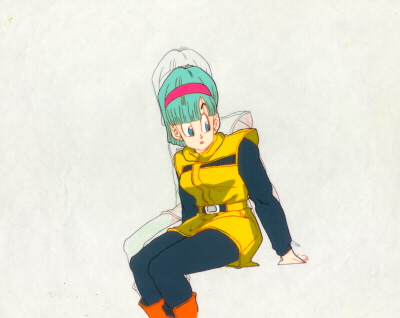
Either way, it's a great find.
ect5150
Better to keep your mouth shut and appear stupid than to open it and remove all doubt.
DB DBox color corrections & DBox color corrections.
Better to keep your mouth shut and appear stupid than to open it and remove all doubt.
DB DBox color corrections & DBox color corrections.
-
AnimeMaakuo
- Advanced Regular
- Posts: 1462
- Joined: Sun Aug 15, 2010 10:10 pm
Re: Color Correcting the Dragon Box - 3 Part Spectacular
It's possible that Toei kept their cels in better storage, whereas other people didn't. If you notice in the last cel, the background isn't really white anymore.ect5150 wrote:Bulma's hair here is more of what people expect I would think... but it's still a different hue than the animation cels people scan in---
Either way, it's a great find.
My YouTube
Soppa Saiyjins from Dorgou Ballru Zetto is my favorite transformation everah, especially when Trounksoru did it in front of Seru and when Bejita did it when he faced Jingonigen-hachigo. But for real, I use the FUNi pronunciation. - Soppa Saia People
Soppa Saiyjins from Dorgou Ballru Zetto is my favorite transformation everah, especially when Trounksoru did it in front of Seru and when Bejita did it when he faced Jingonigen-hachigo. But for real, I use the FUNi pronunciation. - Soppa Saia People
-
clutchins

- Beyond-the-Beyond Newbie
- Posts: 412
- Joined: Wed Jun 11, 2014 5:52 pm
- Location: Mt. Paozu
- Contact:
Re: Color Correcting the Dragon Box - 3 Part Spectacular
So what is this set that Toei is offering? Something about cel scans for every episode?
NC's resident Dragon Ball superfan
Episode Guides: [ DB | DBZ Uncut | DBZ Edited | DBGT | Movies/Specials | Kai ]
Episode Guides: [ DB | DBZ Uncut | DBZ Edited | DBGT | Movies/Specials | Kai ]
Kamiccolo9 wrote:I mean, you're pretty open about looking at cartoon porn. Why would you do that? It's fiction. The proportions of these women are not possible to reach in reality.JacobYBM wrote:No, why would it? It's fiction. The strength of the characters is not possible to reach in reality.Original Thread Topic wrote:Did Dragon Ball ever motivate you to exercise?
-
Attitudefan
- I Live Here
- Posts: 2963
- Joined: Tue Aug 03, 2010 9:51 pm
- Location: Canada
Re: Color Correcting the Dragon Box - 3 Part Spectacular
I never thought the sky would be pure blue at that point since without the power ball, the sky was pink since it was evening. The power ball isn't the sun and gives off a different hue along with the evening sky.
My favourite art style (and animation) outside Toriyama who worked on Dragon Ball: Katsuyoshi Nakatsuru, Masaki Satō, Minoru Maeda, Takeo Ide, Hisashi Eguchi, Katsumi Aoshima, Tomekichi Takeuchi, Masahiro Shimanuki, Kazuya Hisada
Re: Color Correcting the Dragon Box - 3 Part Spectacular
It's the Dragon Box footage. They used these cel scans just for thumbnails.lansing wrote:a better idea, have someone buy the whole package and screen capture all the episodes...well that'll take a long time. The price is higher than the old anime in bandai channel, but it's still reasonable.
Now we have to first make sure that the color in the show are indeed what they looks like in the thumbnails.
The sky is originally a little greenish on episode 30 to 35, but not as much as that on the DBox. That's the intended color.ect5150 wrote:So, we actually have a better reference to target those episodes? Green sky? Blue sky? Teal sky is it now? The clouds actually have some green in them, which surprises me.
Re: Color Correcting the Dragon Box - 3 Part Spectacular
I like seeing fans applying and showing what their own corrections would be like.
I wish there was a thread with fans showing more than just color correction, mimicking the way Toei (and other anime companies) corrects akward positions, drawings, facial expressions, proportions, etc... on shots that need it the most for the Blu-ray releases.
A lot of people have become experts at picture editing nowadays, and some of them are really good at drawing in general as a bonus.
I'm always surprised that there are never fans to show "I corrected those shots and this is a comparison of what they look like in the show and how they should have looked like according to me".
You know, beyond color correction, just like when you compare the online version with the Blu-ray version (faces redrawn, positions adjusted, proportions corrected, colors adjusted, effects added, mouth redrawn here, eyes adjusted there, all those things that can sometimes be just one change on a shot that makes it better and corrects what felt wrong).
But I guess it would be too time consuming, despite being extremely interesting to see everyone's interpretations and versions of what would be best (as interesting as seeing fans' own created covers if a release were up to them, something that also happens more rarely than I would have thought).
I wish there was a thread with fans showing more than just color correction, mimicking the way Toei (and other anime companies) corrects akward positions, drawings, facial expressions, proportions, etc... on shots that need it the most for the Blu-ray releases.
A lot of people have become experts at picture editing nowadays, and some of them are really good at drawing in general as a bonus.
I'm always surprised that there are never fans to show "I corrected those shots and this is a comparison of what they look like in the show and how they should have looked like according to me".
You know, beyond color correction, just like when you compare the online version with the Blu-ray version (faces redrawn, positions adjusted, proportions corrected, colors adjusted, effects added, mouth redrawn here, eyes adjusted there, all those things that can sometimes be just one change on a shot that makes it better and corrects what felt wrong).
But I guess it would be too time consuming, despite being extremely interesting to see everyone's interpretations and versions of what would be best (as interesting as seeing fans' own created covers if a release were up to them, something that also happens more rarely than I would have thought).

Re: Color Correcting the Dragon Box - 3 Part Spectacular
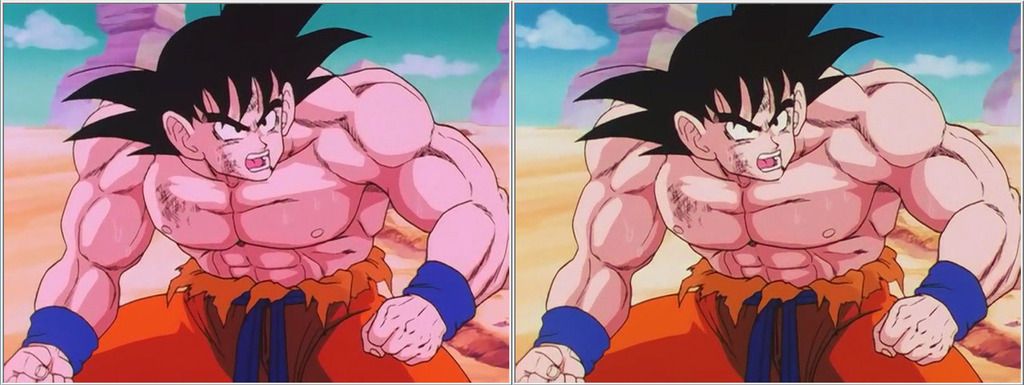
Thank you Ashura!!! Here's my first attempt. I have a few issues with artifacting during the beam struggle, but it's worth it for blue skies. 
-
darkknightkryta

- Newbie
- Posts: 20
- Joined: Fri Dec 27, 2013 2:21 am
Re: Color Correcting the Dragon Box - 3 Part Spectacular
So there was something I noticed after going through my Rock the Dragon set and watching the Goku vs Vegeta fight. I noticed the skies were a mix of green/blue vs the blue that was in the level sets. Here's a shot:
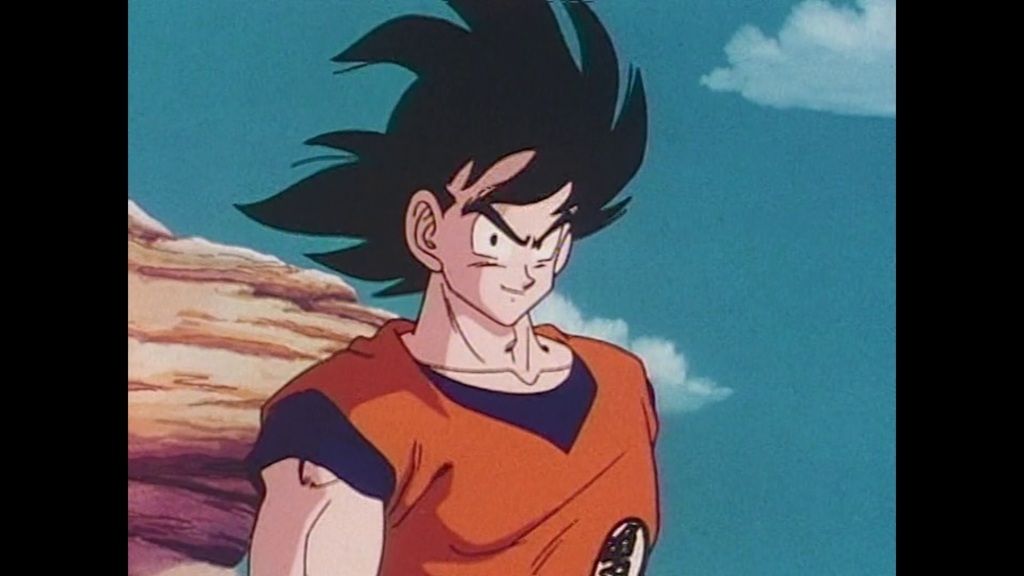
So I started playing around with saturation levels and contrast/brightness of the Dragon Box footage and I got this:
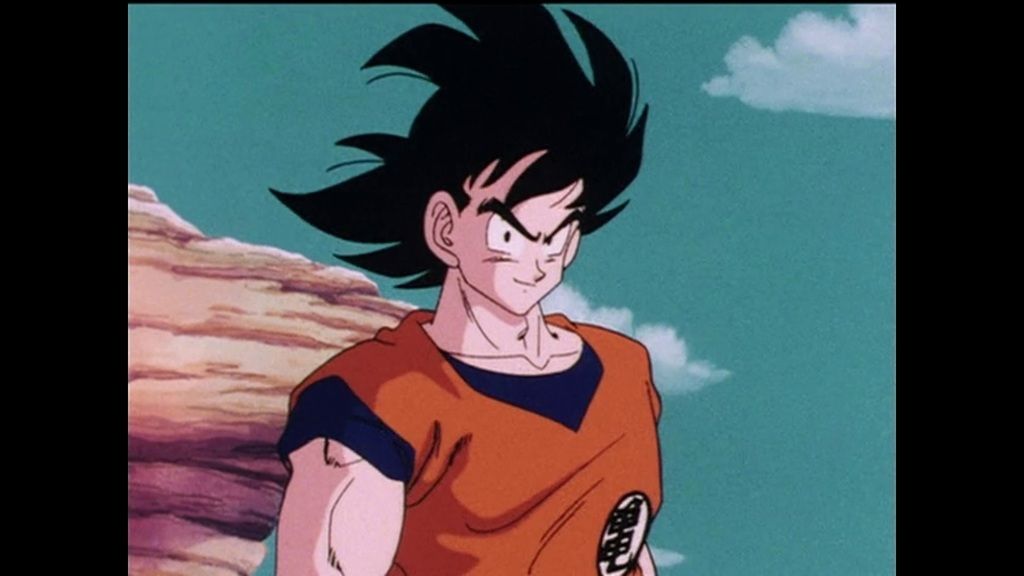
Pretty close. A slight change in the tint gave me this:
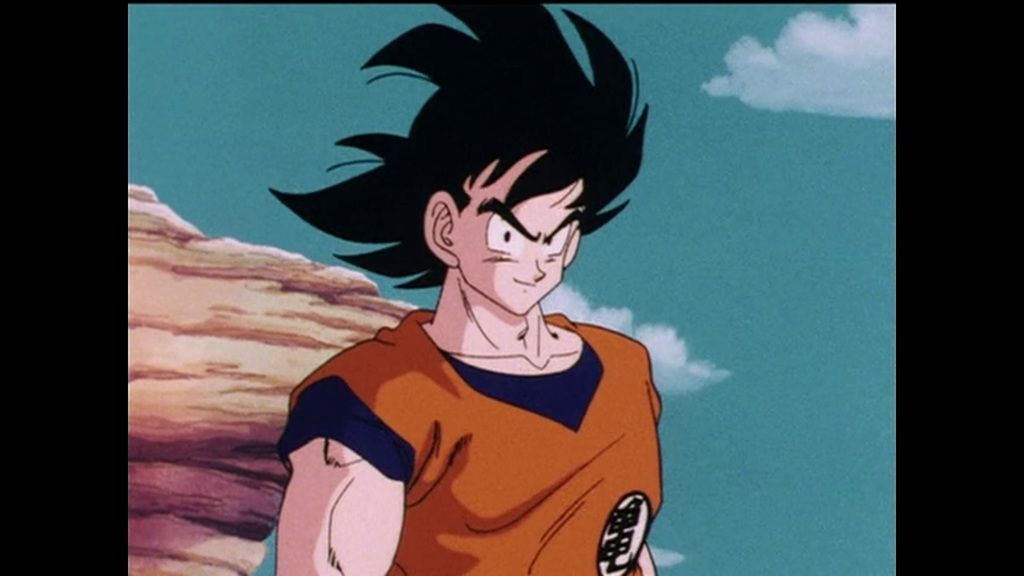
It's not perfect. The pink overcast can't be completely removed but it's pretty close. The original dragon box looks like this:
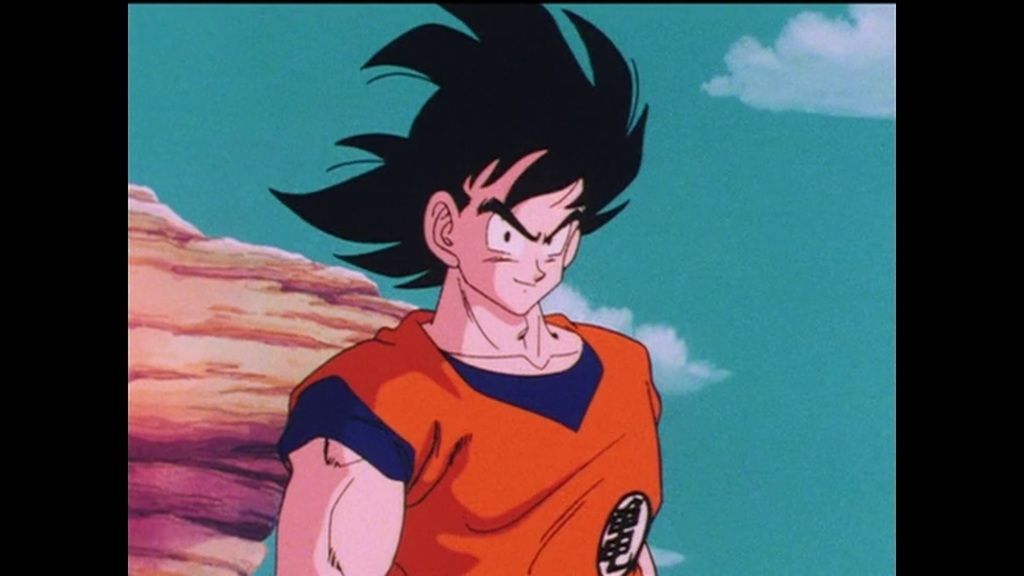
The dragon box footage is quite a bit oversaturated. Dialing things down helps a lot. I also agree with the theory that tint changes as you progress with copies. It explains why the level set footage's skies are quite blue in comparison:
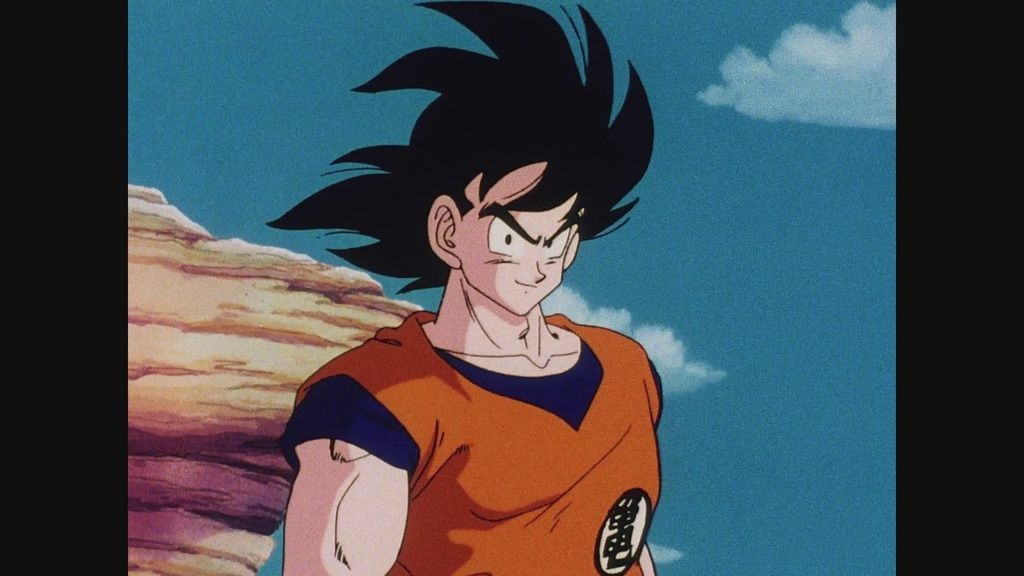
What do you guys think?
So I started playing around with saturation levels and contrast/brightness of the Dragon Box footage and I got this:
Pretty close. A slight change in the tint gave me this:
It's not perfect. The pink overcast can't be completely removed but it's pretty close. The original dragon box looks like this:
The dragon box footage is quite a bit oversaturated. Dialing things down helps a lot. I also agree with the theory that tint changes as you progress with copies. It explains why the level set footage's skies are quite blue in comparison:
What do you guys think?
Re: Color Correcting the Dragon Box - 3 Part Spectacular
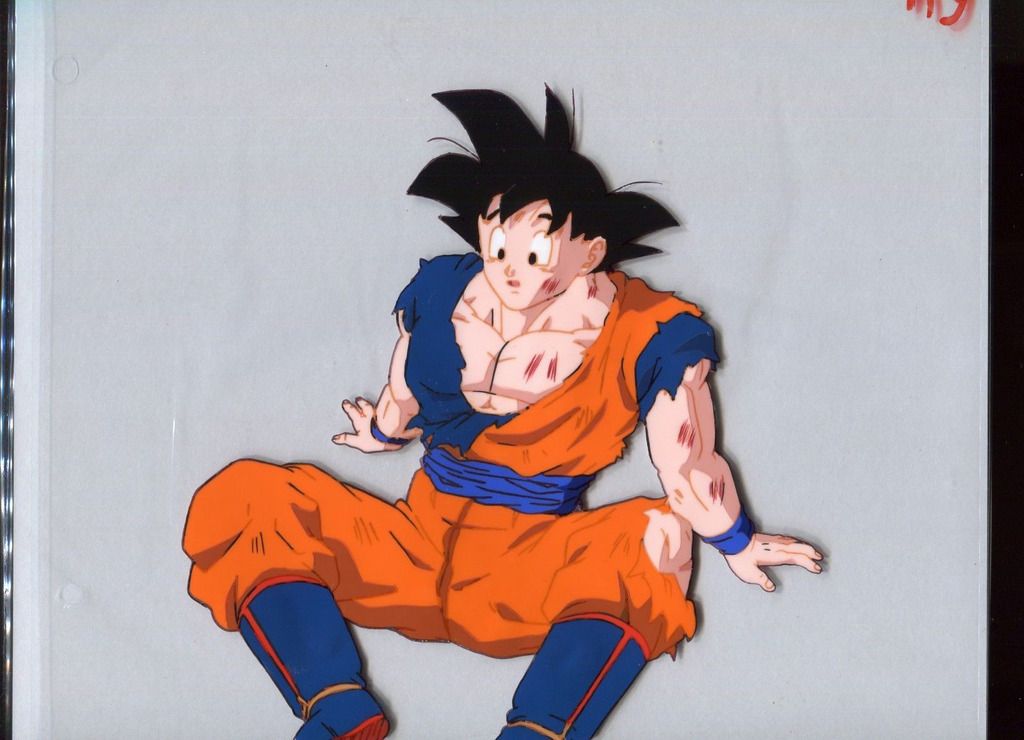
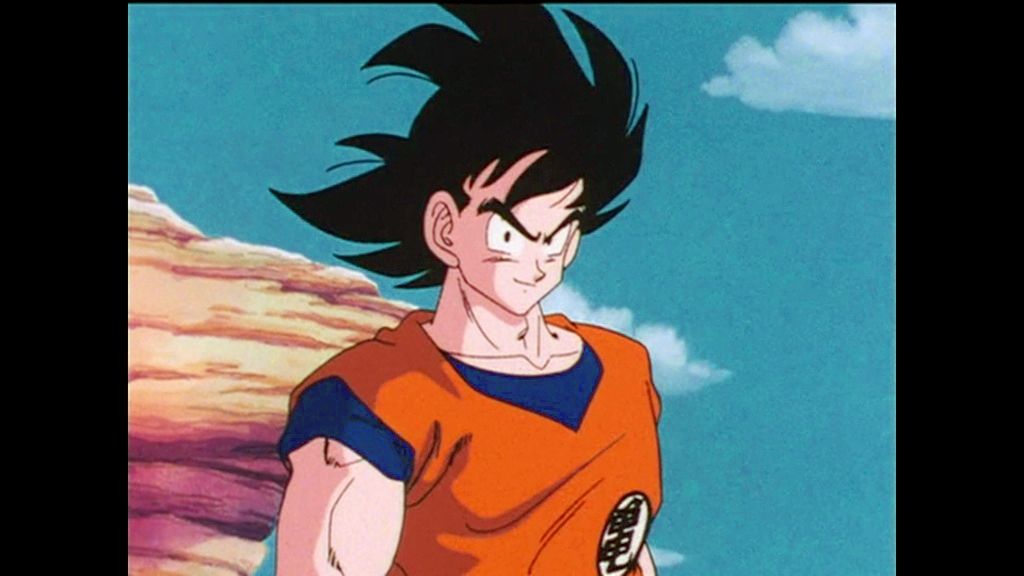
Not bad at all. One thing that is nice about the Dragon Box shot is that it preserves more of the dark detail. It is especially noticeable on Goku's undershirt. I thought I might put some effort in photoshop and see how close I could get the footage to the original cels. Here are my results.
I think I did a pretty good job. I used this cel as reference and focused on bringing the color of Goku's gi and undershirt to as close to the cel as possible.
I'm not very happy with the artifacting in both the sky and the undershirt, but I wanted to get accurate color over visual fidelity. If used with professional tools on uncompressed masters, I think it would look much better.
I think I did a pretty good job. I used this cel as reference and focused on bringing the color of Goku's gi and undershirt to as close to the cel as possible.
I'm not very happy with the artifacting in both the sky and the undershirt, but I wanted to get accurate color over visual fidelity. If used with professional tools on uncompressed masters, I think it would look much better.
Re: Color Correcting the Dragon Box - 3 Part Spectacular
I did some fixes to screenshots of the movies (different approach from the series), I wanted something vivid that could resemble the original cels, and better definition on darks. To the left the funimation blurays which IMO is too saturated, with too much contrast and crushed blacks.
http://compare.bakashots.me/compare.php?setId=1594
http://compare.bakashots.me/compare.php?setId=1594
Last edited by Dogway on Thu Aug 13, 2015 3:16 am, edited 1 time in total.
-
darkknightkryta
- Newbie
- Posts: 20
- Joined: Fri Dec 27, 2013 2:21 am
Re: Color Correcting the Dragon Box - 3 Part Spectacular
Looks good. Overall the biggest thing I've noticed though is that Toei's originals aren't as damaged as I thought (There's still overcasts). I think there was saturation issues when bringing it to DVD which made things worse. The rest of the colour issues are probably from not making an analog copy. Even the cells of Vegeta's and Raditz hair; It's not as black. But when making an analogue copy it becomes darker. They probably chose different colours assuming the change, probably the same with the "skies". Like there's more green in the Rock the Dragon/Saban version than there is in the Level Sets. Makes me wonder what would have happened had Toei worked with a first gen copy(Right terminology?) instead of the originals.
-
Attitudefan
- I Live Here
- Posts: 2963
- Joined: Tue Aug 03, 2010 9:51 pm
- Location: Canada
Re: Color Correcting the Dragon Box - 3 Part Spectacular
If you guys didn't know, moving images from computer, or a cel, or from a film reel, to a television medium does lose so much color and shades.
Sony Vegas movie editing software has an effect called "TV colors" that help one edit better for TV. I did a film back in high school in black and white and on my computer it looked fine. When I bright it over onto DVD and watched it on my TV all the blacks were crushed and I lost nearly all the footage to blackness.
I reworked it using the TV colors preset and it fixed this problem since I could see the color and shade information I was losing and work around it.
So, yes moving from film or a cell you can see on the computer or in person will have way more color range than when you see it on tv.
Sony Vegas movie editing software has an effect called "TV colors" that help one edit better for TV. I did a film back in high school in black and white and on my computer it looked fine. When I bright it over onto DVD and watched it on my TV all the blacks were crushed and I lost nearly all the footage to blackness.
I reworked it using the TV colors preset and it fixed this problem since I could see the color and shade information I was losing and work around it.
So, yes moving from film or a cell you can see on the computer or in person will have way more color range than when you see it on tv.
My favourite art style (and animation) outside Toriyama who worked on Dragon Ball: Katsuyoshi Nakatsuru, Masaki Satō, Minoru Maeda, Takeo Ide, Hisashi Eguchi, Katsumi Aoshima, Tomekichi Takeuchi, Masahiro Shimanuki, Kazuya Hisada
Re: Color Correcting the Dragon Box - 3 Part Spectacular
I've noticed some of what you're talking about. Do you know if it has to do with the actual television displays or the color range of the physical media like DVD or Bluray? Or maybe it has to do with compression when moving from the digital masters to what we get as consumers?Attitudefan wrote:If you guys didn't know, moving images from computer, or a cel, or from a film reel, to a television medium does lose so much color and shades.
Sony Vegas movie editing software has an effect called "TV colors" that help one edit better for TV. I did a film back in high school in black and white and on my computer it looked fine. When I bright it over onto DVD and watched it on my TV all the blacks were crushed and I lost nearly all the footage to blackness.
I reworked it using the TV colors preset and it fixed this problem since I could see the color and shade information I was losing and work around it.
So, yes moving from film or a cell you can see on the computer or in person will have way more color range than when you see it on tv.
-
Attitudefan
- I Live Here
- Posts: 2963
- Joined: Tue Aug 03, 2010 9:51 pm
- Location: Canada
Re: Color Correcting the Dragon Box - 3 Part Spectacular
It has to do with the TV itself. While computer monitors can show minor differences in color, a TV is limited to only show a few hundred colors on a scale. So the information is a fraction of what it is on a computer or film when shown on a TV set.
A DVD, if played on a computer will still have better color information than if it is shown on the TV
A DVD, if played on a computer will still have better color information than if it is shown on the TV
My favourite art style (and animation) outside Toriyama who worked on Dragon Ball: Katsuyoshi Nakatsuru, Masaki Satō, Minoru Maeda, Takeo Ide, Hisashi Eguchi, Katsumi Aoshima, Tomekichi Takeuchi, Masahiro Shimanuki, Kazuya Hisada
Re: Color Correcting the Dragon Box - 3 Part Spectacular
Huh, the more you know. *insert rainbow shooting star*Attitudefan wrote:It has to do with the TV itself. While computer monitors can show minor differences in color, a TV is limited to only show a few hundred colors on a scale. So the information is a fraction of what it is on a computer or film when shown on a TV set.
A DVD, if played on a computer will still have better color information than if it is shown on the TV