Australian/Madman (R4) Dragon Ball Box Sets: Review



-
ect5150

- Advanced Regular
- Posts: 1063
- Joined: Fri Sep 15, 2006 9:17 pm
- Location: Tenkaichi Tournament Grounds
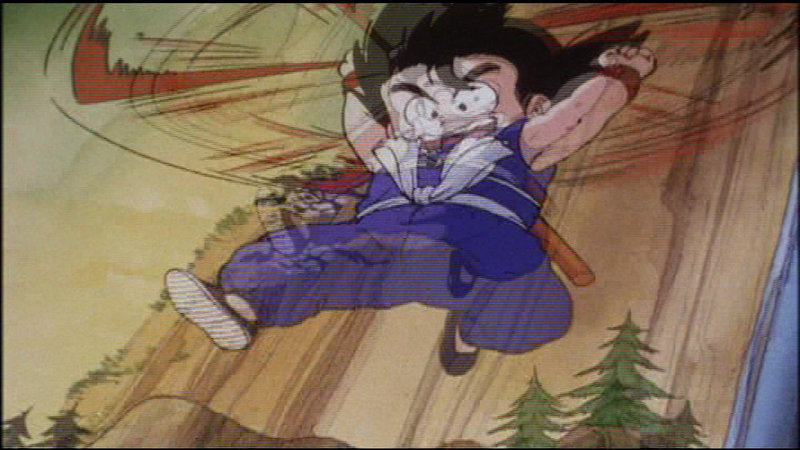
Then you need to use a program to DE-Interlace it and ideally restore its original 24 fps on the fly (or just do a frame-doubler). There are programs that do it just fine.bkev wrote:As said, my comptuer brings out the worst of those kinds of things (ie interlacing.) However, the "ghosting" as I call it is from the clip and not the fact that I used VLC.
I thought VLC would connect to ffdshow, which should do the trick. Makes it look far better. Of course, the best thing is to make your own AVISynth script to handle it

ect5150
Better to keep your mouth shut and appear stupid than to open it and remove all doubt.
DB DBox color corrections & DBox color corrections.
Better to keep your mouth shut and appear stupid than to open it and remove all doubt.
DB DBox color corrections & DBox color corrections.
-
Mystic Jack

- Regular
- Posts: 576
- Joined: Fri Jul 28, 2006 4:42 am
- Location: AUSTRALIA!!!!

-
ect5150
- Advanced Regular
- Posts: 1063
- Joined: Fri Sep 15, 2006 9:17 pm
- Location: Tenkaichi Tournament Grounds
I just bought the first half of the set myself. Waiting on Madman to mail it though. Its been 'processing' for about a week. hopefully they'll deliver the goods.
ect5150
Better to keep your mouth shut and appear stupid than to open it and remove all doubt.
DB DBox color corrections & DBox color corrections.
Better to keep your mouth shut and appear stupid than to open it and remove all doubt.
DB DBox color corrections & DBox color corrections.

-
Ex-Dubbie369

- OMG CRAZY REGEN
- Posts: 898
- Joined: Mon Nov 27, 2006 2:14 am
- Location: Anaheim, CA
fps_anth wrote:All right, I'm ready to finally buy the set. However, there is something I must ask. I have a region free DVD player. However, does that ensure that I will be able to view these DVDs on my TV?
Well, I have a DVD player that converts PAL to NTSC. I'm not sure if there are gonna be any problems with video quality by just hacking the DVD player's region settings. If nothing else, just use your computer since it doesn't care about formats.
If you have a region free DVD player and a fairly new TV it's all good. When I bought the Saga of Goku sets I was worried about that myself, but it turned out fine.fps_anth wrote:All right, I'm ready to finally buy the set. However, there is something I must ask. I have a region free DVD player. However, does that ensure that I will be able to view these DVDs on my TV?
Is de-interlacing enabled? It should automatically be on, but if it isn't go to:SonGokuGT wrote:I have PowerDVD and the interlacing makes it look horrible... :/
Configuration: Video: Advanced and there should be three options to choose from. I just go with Auto-Select. Hope that helps.
EDIT: You can also de-interlace in VLC; just right click and highlight the Deinterlace option. Blend usually works best.

I tried watching the clip with PowerDVD as you suggested,and I saw no problems with it at all. Even when I paused it. So I'm sure it would look just fine on a TV to like SatoSky said.
But can you take pictures with PowerDVD like you can with VLC ? I'll see if I can and try and upload the same picture as taken above for comparison.
But can you take pictures with PowerDVD like you can with VLC ? I'll see if I can and try and upload the same picture as taken above for comparison.
[color=blue]"Inherited Will.The Destiny of the Age and the Dreams of it's People.These will not be stopped.As long as People continue to pursue the Meaning of Freedom,They will never cease to be !"
~ 0ne Piece ~
"H-heh heh heh ... What is 'evil'? If I'm loyal to what you say is right,is that all it takes to make me 'good' ?"
~ Bakura ~ Yu-Gi-Oh ! Duel Monsters ~ [/color]
~ 0ne Piece ~
"H-heh heh heh ... What is 'evil'? If I'm loyal to what you say is right,is that all it takes to make me 'good' ?"
~ Bakura ~ Yu-Gi-Oh ! Duel Monsters ~ [/color]

-
ect5150
- Advanced Regular
- Posts: 1063
- Joined: Fri Sep 15, 2006 9:17 pm
- Location: Tenkaichi Tournament Grounds
I'm splitting hairs here (and I have no idea what options VLC has in it), but DB/DBZ/DBGT is animated at 24 (23.976) frames per second. Therefore an actual inverse telecine process will restore the progressive frames and restore the original frame rate. Just blending the fields won't do that.SatoSky wrote:EDIT: You can also de-interlace in VLC; just right click and highlight the Deinterlace option. Blend usually works best.
If it has that option, that's the one you want to take.
ect5150
Better to keep your mouth shut and appear stupid than to open it and remove all doubt.
DB DBox color corrections & DBox color corrections.
Better to keep your mouth shut and appear stupid than to open it and remove all doubt.
DB DBox color corrections & DBox color corrections.
Ok,thanks. Yeah it looks just fine.SatoSky wrote:Yea you can take images with PowerDVD as well. Here's how you do it.
I saved you the trouble of going for bkev's image though:
-http://img207.imageshack.us/img207/3953/pdvd004jr0.png-
There it is in it's OAR.

[color=blue]"Inherited Will.The Destiny of the Age and the Dreams of it's People.These will not be stopped.As long as People continue to pursue the Meaning of Freedom,They will never cease to be !"
~ 0ne Piece ~
"H-heh heh heh ... What is 'evil'? If I'm loyal to what you say is right,is that all it takes to make me 'good' ?"
~ Bakura ~ Yu-Gi-Oh ! Duel Monsters ~ [/color]
~ 0ne Piece ~
"H-heh heh heh ... What is 'evil'? If I'm loyal to what you say is right,is that all it takes to make me 'good' ?"
~ Bakura ~ Yu-Gi-Oh ! Duel Monsters ~ [/color]
Yea you're totally right. VLC just performs an "on-the-fly" de-interlace. It doesn't do anything to the actual footage, it just makes the interlacing less apparent, and somewhat reduces the ghosting. You still get some jagged edges. If a proper de-interlacing is needed, I go with an AVI Synth script that smoothly de-interlaces the footage, and restores it to it's proper 24 FPS. Actually 23.976 FPS but you know that. I only use that for backing up my movies as progressive frame encodes, for quick viewing of a clip I just use VLC's options.ect5150 wrote:I'm splitting hairs here (and I have no idea what options VLC has in it), but DB/DBZ/DBGT is animated at 24 (23.976) frames per second. Therefore an actual inverse telecine process will restore the progressive frames and restore the original frame rate. Just blending the fields won't do that.SatoSky wrote:EDIT: You can also de-interlace in VLC; just right click and highlight the Deinterlace option. Blend usually works best.
If it has that option, that's the one you want to take.
-
Vegard Aune

- Advanced Regular
- Posts: 1174
- Joined: Tue Feb 27, 2007 12:38 pm
- Location: Norway