Discussion regarding the entirety of the franchise in a general (meta) sense, including such aspects as: production, trends, merchandise, fan culture, and more.
-
lansing
- Beyond-the-Beyond Newbie
- Posts: 311
- Joined: Mon Jan 06, 2014 1:49 am
Post
by lansing » Fri Feb 02, 2018 12:26 pm
Bruma rabu wrote:Ok so heres part of episode one of kai the final chapters.
https://streamable.com/t2ri3
So for the first test i took the the unaltered video of DBZ ep1 and used drdres program to cc it and it came out looking pretty good but had a good amount of blemishes. For this one though i went and tried to fix all the blacks, whites, brightness, and contrast before applying the LUT. Looks like it did much better not perfect but better.
I still only used one picture.
Here are the shoots used
[spoiler]

[/spoiler]
It doesn't matter. The color is way off for the other scenes when you compare them to the season set.
Bruma rabu wrote:I dont know how to script, I'm pretty new to this. I've only been messing around with this for a few months.
I already wrote a few helper scripts in Vapoursynth to do the automate stuff. The only thing most users have to do is installing the require filters and load in the video or text files.
For example, this one is a helper script for jogging down the frame number of all the scene changes. All the purple lines at the bottom are the frames I have done. The users don't have to know anything about programming. They just need to run the script from the VS editor and do the works.
[spoiler]

[/spoiler]
I haven't post them yet because I'm still stuck on that "photoshop auto align" step, I couldn't think of a way to automate it.
-
HakkaiBills93
- Banned
- Posts: 551
- Joined: Fri Jul 07, 2017 3:04 pm
Post
by HakkaiBills93 » Fri Feb 02, 2018 12:35 pm
for example for the two shot you did here what i do with my references
left is mine, right is yours and i add the toei vod cels that for me isn't 100% perfect as you can see mine have more details in the dark area and also in the white area (don't mind the aspect ratio i load straightly the vob on after effect so it is 720x480

-
ionutbigiu1
- Beyond Newbie
- Posts: 128
- Joined: Wed Jul 31, 2013 5:33 am
Post
by ionutbigiu1 » Fri Feb 02, 2018 12:38 pm
HakkaiBills93 wrote:for example for the two shot you did here what i do with my references
left is mine, right is yours and i add the toei vod cels that for me isn't 100% perfect as you can see mine have more details in the dark area and also in the white area (don't mind the aspect ratio i load straightly the vob on after effect so it is 720x480

Indeed the aspect ratio is rather confusing a little hehe . But i dont see the dark details you are talking about .
If you are talking about the shadows in the trees that depends sometimes on frame . I can see pretty clear the details in this frame for example

-
HakkaiBills93
- Banned
- Posts: 551
- Joined: Fri Jul 07, 2017 3:04 pm
Post
by HakkaiBills93 » Fri Feb 02, 2018 12:42 pm
i don't talk using your cc as reference but the dragon box , i just say that i have more details in the dark colors AND in the white that's all
-
ionutbigiu1
- Beyond Newbie
- Posts: 128
- Joined: Wed Jul 31, 2013 5:33 am
Post
by ionutbigiu1 » Fri Feb 02, 2018 12:43 pm
HakkaiBills93 wrote:i don't talk using your cc as reference but the dragon box , i just say that i have more details in the dark colors AND in the white that's all
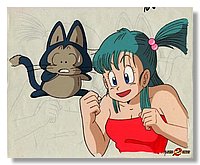
I am trying to find the extra details but I CAN'T see them in yours, details that are so proeminent to be noticed xD, that's all.
I am trying to find the extra details in dark colors but i can';t seem to notice.*cough* Vide's hair* cought*
sneezing in italian

Last edited by
ionutbigiu1 on Fri Feb 02, 2018 12:49 pm, edited 1 time in total.
-
HakkaiBills93
- Banned
- Posts: 551
- Joined: Fri Jul 07, 2017 3:04 pm
Post
by HakkaiBills93 » Fri Feb 02, 2018 12:48 pm
okay it's not the best example but in the cloud my white is more detailed, in my gohan cloth, the grey is more visible but sure it's not the best episode to show this kind of details but anyway it's not a contest just that i didn't raise the white so i didn't loose details, but there is more details than the dbox in the white
other things, bulma's hair aren't blue
it should look more like that

-
ionutbigiu1
- Beyond Newbie
- Posts: 128
- Joined: Wed Jul 31, 2013 5:33 am
Post
by ionutbigiu1 » Fri Feb 02, 2018 1:10 pm
HakkaiBills93 wrote:okay it's not the best example but in the cloud my white is more detailed, in my gohan cloth, the grey is more visible but sure it's not the best episode to show this kind of details but anyway it's not a contest just that i didn't raise the white so i didn't loose details, but there is more details than the dbox in the white
other things, bulma's hair aren't blue
it should look more like that

Based on the light of that Cell and how puar is looking damn...that is hard to take in consideration as an example.

Last edited by
ionutbigiu1 on Fri Feb 02, 2018 1:37 pm, edited 2 times in total.
-
ionutbigiu1
- Beyond Newbie
- Posts: 128
- Joined: Wed Jul 31, 2013 5:33 am
Post
by ionutbigiu1 » Fri Feb 02, 2018 1:33 pm
HakkaiBills93 wrote:https://www.google.fr/search?q=bulma+ce ... 00&bih=769
just by looking on google for bulma cels all i have find allways have shade of green in the blue, even the broadcast clip i have seen and lot of foreign dub have green in her hair even when the sky color is right
The picture you showed me had just a slight dark detail showing . So not sure what were you saiyng.
-
HakkaiBills93
- Banned
- Posts: 551
- Joined: Fri Jul 07, 2017 3:04 pm
Post
by HakkaiBills93 » Fri Feb 02, 2018 1:48 pm
the link gave all link to bulma cels on google and on each of them (except those from movie the path to power, bulma have green in his hair, on original broadcast videos bulma also have green in his hair
-
HakkaiBills93
- Banned
- Posts: 551
- Joined: Fri Jul 07, 2017 3:04 pm
Post
by HakkaiBills93 » Fri Feb 02, 2018 2:13 pm
you made a point it's so complicate as most of the cels have green in his hair i can be wrong, i'll see this
but it show that color match is complicate when you have so many differrent colors on cels, episodes etc...on some cels it's green on other it's light blue , on broadcast clip it's greenish, on funimation dvd it's sometimes greenish sometimes blue, the same in french, and the same on carddass
-
lansing
- Beyond-the-Beyond Newbie
- Posts: 311
- Joined: Mon Jan 06, 2014 1:49 am
Post
by lansing » Fri Feb 02, 2018 2:20 pm
Scanned images need their brightness to be adjusted before doing anything with them.
-
HakkaiBills93
- Banned
- Posts: 551
- Joined: Fri Jul 07, 2017 3:04 pm
Post
by HakkaiBills93 » Fri Feb 02, 2018 2:57 pm
ionutbigiu1 wrote:
And we can continue for a loooong time . But yeah .Dragon ball is a wierd place to be when it is about Color Correction haha .,
*breathing in klingonian*
as you can see it's the two same image but colors are differrent, look at tenshin han cloth, goku and bulma outfit, sometimes there are so many differrent colors for the same things

anyway it's a reason why i never encode my things
-
ionutbigiu1
- Beyond Newbie
- Posts: 128
- Joined: Wed Jul 31, 2013 5:33 am
Post
by ionutbigiu1 » Fri Feb 02, 2018 3:12 pm
HakkaiBills93 wrote:ionutbigiu1 wrote:
And we can continue for a loooong time . But yeah .Dragon ball is a wierd place to be when it is about Color Correction haha .,
*breathing in klingonian*
as you can see it's the two same image but colors are differrent, look at tenshin han cloth, goku and bulma outfit, sometimes there are so many differrent colors for the same things

anyway it's a reason why i never encode my things
1 thing is for sure , dragon ball is f-ed up, xD
-
Bruma rabu
- Regular
- Posts: 517
- Joined: Mon Nov 07, 2016 10:12 pm
Post
by Bruma rabu » Fri Feb 02, 2018 6:58 pm
That's an understatement lol. That's kinda why I'm looking for something more consistent than 100% accurate. I'm trying that make a kai cut out the dboxes. I seem to have gotten cutting up and syncing it to kai audio down but colors, brightness, and contrast is where to problems come in. I think I might stick with the color of kai 1.0 but it gets tricky with the final chapters.

Bulma is awesome... but chi-chi is best waifu

-
ionutbigiu1
- Beyond Newbie
- Posts: 128
- Joined: Wed Jul 31, 2013 5:33 am
Post
by ionutbigiu1 » Sat Feb 03, 2018 3:50 am
Bruma rabu wrote:That's an understatement lol. That's kinda why I'm looking for something more consistent than 100% accurate. I'm trying that make a kai cut out the dboxes. I seem to have gotten cutting up and syncing it to kai audio down but colors, brightness, and contrast is where to problems come in. I think I might stick with the color of kai 1.0 but it gets tricky with the final chapters.
Well that's the point of depending of other releases that ahave more or less decent colors . You will not have a complete or a consistent overall color correction , which is not actually a color correction but more like a color match. So it is your call, your choice. I for one I decided to not be limited by other releases , you will have to experiment more and try different ways beside Dr Dre's Tool for this big of a project, use your eyes, your time and your patience and you will not feel stucked when you will be out of releases to use an example, especially that you will need to work scene by scene . If you dream of actually having all dragon ball series done, color matching tools or scripts are not for you . If you want to have some fun and so on episodes or sagas that have somewhat decent color approach on the series...then color match is for you.
-
HakkaiBills93
- Banned
- Posts: 551
- Joined: Fri Jul 07, 2017 3:04 pm
Post
by HakkaiBills93 » Sat Feb 03, 2018 9:48 am
for references you just need to collect images from dragon ball, z, gt, watch which ones are the best scanned and watch them, that way you'll see which ones are right colors, you can also help you with cels etc...
you'll have some difficulty like i have with some colors but it's not so hard to do it.
the main things is : keep in mind you'll spend several hours learning how to use software by playing with it (it's better than just copy how someone use it),
keep redoing it often untilyou will be ok with the result.
about you wanted to make a dbz with dbkai color it's not a color correction work as color correcting is make colors like it was supposed to be, but make dbz looking like kai would be the same as make db super looking like z it can't be called "color correction" as that's the intended colors even if we dissagree with them