I can't remember where but I read that you, Vegetto EX, use DVD2AVI. I have no idea what this is. For converting DVD's to AVI I use a program call "Auto Gordian Knot", it's a simple XviD/DivX converter.
I know a lot about this style of stuff, but codecs (to me) are like Broly and kindness. An unexplored area. I generally just have the newest XviD/DivX codecs installed but do you use different ones? I put project Doomrider through AutoGK and it turned out at 250-ish Megabytes. I did this because I thought that 150 Megabytes was to low for such a movie.
Your videos Succsion, I Walk Alone and Doomrider seem to be compressed quite well. How do you accheive this? Is it codecs? A program? What? Please do share. If you've said all of this before, I haven't read it.
As for Premiere, do you have to convert the files to AVI first? A friend said that you can directly edit the Mpeg-2 files of a DVD (once they're imported); but he's full of shit.
Thanks. Oh and by the way, I've seen all of your Dragon Ball related videos.
Premiere, AVI and codecs Q&A (Vegetto EX, you could help
-
VegettoEX
- Kanzenshuu Co-Owner & Administrator
- Posts: 17859
- Joined: Sat Jan 10, 2004 3:10 pm
- Location: New Jersey
- Contact:
DVD2AVI is a horrible misnomer; it's quite apparent they realized that, since it's now called DGIndex. Its primary purpose is not for converting DVD rips to AVI files... it's for creating a middle-man project file that acts as a frameserver for video editing programs. The AVS scripts point to the D2V file, which in turn points over to the raw VOBs.
The theory behind this is that it allows you to use the actual DVD-quality files directly in your video editing program (namely, Premiere). Now, where it gets powerful is when you start doing things like inverse-telecining or deinterlacing the video right in the script, and then on another level, doing things like color-correction and clean-up to make it look even better than it actually does on the DVD (especially R1 DVDs).
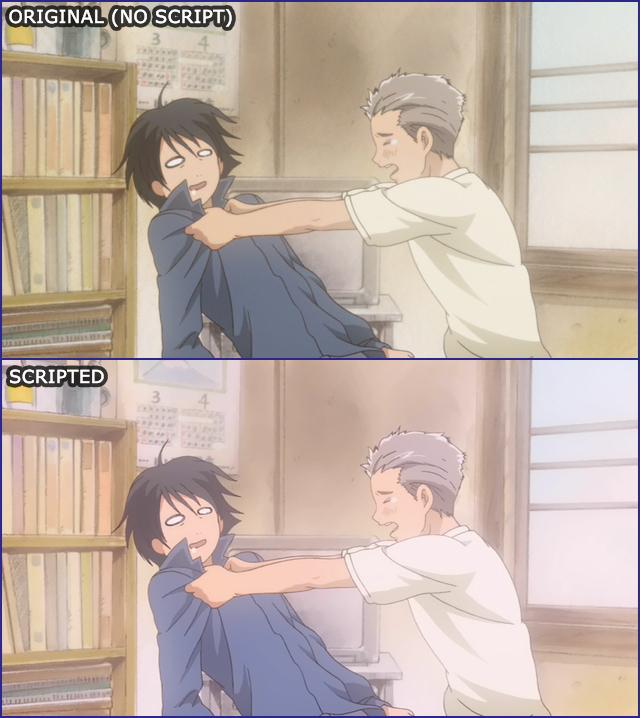
For example, here's our typical AVS script for the Honey & Clover R2 DVDs:
And so here's what it comes out to... it's just a JPEG, but you can pretty clearly see what's up.
One of the main concepts we always try to drill into heads at conventions and the like is that you want the footage you bring into your project to be the absolute best it can be... the better you put it in, the better it's going to come out. There's ALWAYS going to be some sort of compression before someone sees it (be it online or at a convention), so the more high-quality file you can throw at your compressor, the higher-quality file it's going to spit back in return.
Another huge concept is understanding that what you export off of your timline should *never* be either (1) your online distribution version, or (2) your convention submission version. You always want to export a "lossless" version of your video off the timeline, and then throw THAT over to your compressors for the encodes.
For example, when you're trying to re-compress "Doomrider", it's taking something that's already compressed... which means it's had a TON of digital noise added to it... and it's trying to do something efficient with it. It's taking it a TON of extra work to get something acceptable, more-so than it did when I had the raw, full-quality export off the timeline. Even then, I was having problems getting it to an acceptable size, because it's just so darn BUSY of a video; VirtualDub and XviD were kinda collapsing under the weight of the video . Basically, I kept lowering the bitrate until I found a happy medium between filesize and video quality. My initial encodes were muuuuuuuuuch larger, believe me.
Long story short, it's probably too much to take in at first, but check out the main tech guide over on AnimeMusicVideos.org. It'll be a big help.
The theory behind this is that it allows you to use the actual DVD-quality files directly in your video editing program (namely, Premiere). Now, where it gets powerful is when you start doing things like inverse-telecining or deinterlacing the video right in the script, and then on another level, doing things like color-correction and clean-up to make it look even better than it actually does on the DVD (especially R1 DVDs).
For example, here's our typical AVS script for the Honey & Clover R2 DVDs:
It's probably gibberish to most people out there, but if you actually look at some of the wording in there, you can kinda figure out what's going on. It's an interlaced show, so we're inverse-telecining it. Then we're throwing some clean-up scripts on it to get rid of the minor MPEG-2 grain, and then sharpening up that image a little bit. There's some color tweaking going on, and then the random stuff at the end to make it look the way I want it to look in Premiere or making little clips for After Effects.AVS Script wrote:SetMemoryMax(16)
mpeg2source("C:\Stuff\VideoEditing\Honey and Clover\ep_01.d2v").Telecide(1).Decimate(5)
deen("a2d",4,6,6)
ssxsharpen()
FastLineDarken()
colorYUV(gain_u=10)
colorYUV(gain_v=1)
Levels(0, 1.3, 255,0, 255)
tweak(sat=1.2)
tweak(bright=1.1)
AssumeFPS(24)
LanczosResize(720,360)
AddBorders(0,60,0,60)
And so here's what it comes out to... it's just a JPEG, but you can pretty clearly see what's up.
One of the main concepts we always try to drill into heads at conventions and the like is that you want the footage you bring into your project to be the absolute best it can be... the better you put it in, the better it's going to come out. There's ALWAYS going to be some sort of compression before someone sees it (be it online or at a convention), so the more high-quality file you can throw at your compressor, the higher-quality file it's going to spit back in return.
Another huge concept is understanding that what you export off of your timline should *never* be either (1) your online distribution version, or (2) your convention submission version. You always want to export a "lossless" version of your video off the timeline, and then throw THAT over to your compressors for the encodes.
For example, when you're trying to re-compress "Doomrider", it's taking something that's already compressed... which means it's had a TON of digital noise added to it... and it's trying to do something efficient with it. It's taking it a TON of extra work to get something acceptable, more-so than it did when I had the raw, full-quality export off the timeline. Even then, I was having problems getting it to an acceptable size, because it's just so darn BUSY of a video; VirtualDub and XviD were kinda collapsing under the weight of the video
. Basically, I kept lowering the bitrate until I found a happy medium between filesize and video quality. My initial encodes were muuuuuuuuuch larger, believe me.Long story short, it's probably too much to take in at first, but check out the main tech guide over on AnimeMusicVideos.org. It'll be a big help.
:: [| Mike "VegettoEX" LaBrie |] ::
:: [| Kanzenshuu - Co-Founder/Administrator, Podcast Host, News Manager (note: our "job" titles are arbitrary and meaningless) |] ::
:: [| Website: January 1998 |] :: [| Podcast: November 2005 |] :: [| Fusion: April 2012 |] :: [| Wiki: April 2026 |] ::
:: [| Kanzenshuu - Co-Founder/Administrator, Podcast Host, News Manager (note: our "job" titles are arbitrary and meaningless) |] ::
:: [| Website: January 1998 |] :: [| Podcast: November 2005 |] :: [| Fusion: April 2012 |] :: [| Wiki: April 2026 |] ::
-
Narutoball
- Newbie
- Posts: 18
- Joined: Mon Feb 26, 2007 4:21 pm