Wal-Mart's gonna do what its gonna do. The best we can really do is A) not employ or otherwise ally ourselves with them and B) spread the word. In the meantime, spending your pittance on DBZ isn't going to change anything-- hell, at least part of it will go to fund some poor underpaid sap's paycheck, even if it is only two or three pennies' worth.
~Da Lemmy
Dragon Ball Z: Cooler Double Feature Discussion
-
Li'l Lemmy

- I Live Here
- Posts: 2456
- Joined: Fri Jun 03, 2005 1:21 am
- Location: Massachusetts
- Contact:
The NUMBER ONE Goten fan, and a fucking epic one at that.Goten of Japan wrote:Don't go 9... Go 10! (Go-ten. Goten. Get it? DOOD.)

lol, it will help increase a Manager's bonus....but not the average worker.Li'l Lemmy wrote:Wal-Mart's gonna do what its gonna do. The best we can really do is A) not employ or otherwise ally ourselves with them and B) spread the word. In the meantime, spending your pittance on DBZ isn't going to change anything-- hell, at least part of it will go to fund some poor underpaid sap's paycheck, even if it is only two or three pennies' worth.
~Da Lemmy
Even though Best Buy doesn't have a deal for these movies, I still want to buy them.
The series doesn't start with the arrival of Raditz. Stop being lazy and watch Dragonball.
-
Li'l Lemmy
- I Live Here
- Posts: 2456
- Joined: Fri Jun 03, 2005 1:21 am
- Location: Massachusetts
- Contact:
It's your DBZ and your dollar. Make it count. 
~Da Lemmy
~Da Lemmy
The NUMBER ONE Goten fan, and a fucking epic one at that.Goten of Japan wrote:Don't go 9... Go 10! (Go-ten. Goten. Get it? DOOD.)
-
Acid_Reign

- Advanced Regular
- Posts: 1056
- Joined: Wed Jan 24, 2007 5:59 am
- Location: Massachusetts, USA
- Contact:
I know I’m late with this; been busy. Wanted to address it though:
On an anamorphic widescreen DVD, the image is horizontally compressed to fit within the 720×480 pixel maximum; this is done to retain detail that would otherwise be lost by downsizing and adding black bars. Additionally, DV pixels have a different shape than computer pixels: they’re not square (for SD at least; for HD they are). So, in order to display the image as intended you have to adjust it both horizontally and vertically to make up for the Display and Pixel Aspect Ratio discrepancies.
VLC actually already does this for you, but the numbers it uses are only accurate if you’re enlarging the TV-visible area of the video frame and nothing else. Since we’re enlarging the entire frame, including the parts normally hidden by overscan, it will in fact be a little bit wider than what VLC gives you (853×480). I won’t go over the computations here (unless requested), but the standards-compliant resize is 875×480. There is actually a margin of error with both of these sizes, but it is small enough to be negligible because the precise result comes out to fractions of pixels, which most applications don’t know how to handle.
Here’s the before-and-after:

Round shapes like Garlic Jr.’s head are the perfect test for whether your screenshot is sized correctly or not; if they appear oval-shaped when you know they should be circular, the picture needs to be expanded.
How-To
In VirtualDubMod:
Open your video file. If you’re going direct-from-DVD, then it’ll be X:\VIDEO_TS\VTS_XX_X.VOB—fill in the variables with the proper values (if you don’t know which VTS to choose, start with VTS_01_1 and go from there), scrub to the frame you want, and then in the menu, go to:
Video → Filters → Add → resize. Fill in the values below.

As you can see there are several “filter modes” for you to choose from. These are resampling algorithms that control how the originating pixel values are mapped to the new ones. You will want to use different modes for different tasks; generally speaking, “Bilinear” is better-suited for image enlargement and “Bicubic” or “Lanczos” are better-suited for image reduction, but they will all do the job if you ask them to. VirtualDub has them listed from lowest perceived quality to highest perceived quality, and they’re generally slower-working the higher up you go. This is why most software DVD players use “Nearest Neighbor”: it’s fast, and thus useful for on-the-fly resizing. Though, it’s also the worst-looking for complex images, as it results in a jaggy, blocky effect, seen here:

Now compare that with the other end of the spectrum, Lanczos:

Clearly, the choice of resampling impacts the quality of the image. As a result, it’s a good idea to be consistent with what you choose. If you have a particular preference, use it for both of the screenshots you’re comparing; don’t mix and match.
To save, go to:
Video → Snapshot output frame. Choose PNG, it’s lossless (no degradation; won’t introduce any artifacts that weren’t already present).
In Photoshop:
Open up a plain screenshot with no processing done to it.
Image → Image Size. Same values, but uncheck “Constrain Proportions” and make sure “Resample Image” is checked.

Afterwards, File → Save As or Save for Web & Devices. Again, choose PNG. 24-Bit for highest quality.
All you have to do is resize the image to the correct dimensions. For why, see below. For a mini-tutorial, skip to the how-to.Sprite Satan wrote:How would one go about this?Acid_Reign wrote:Well no, that’s not quite what I mean. If you have any internal filters turned on in VLC, it’s going to modify the outputted image. Better to open the stream directly, without any processing, and save it that way. I personally would use VirtualDubMod to acces the VOB, compensate for the aspect ratio difference (due to the anamorphic encoding), and then save the image.Tsukento wrote:Directly lifted with VLC's snapshot feature, so no print screen or any of that stuff was done.
On an anamorphic widescreen DVD, the image is horizontally compressed to fit within the 720×480 pixel maximum; this is done to retain detail that would otherwise be lost by downsizing and adding black bars. Additionally, DV pixels have a different shape than computer pixels: they’re not square (for SD at least; for HD they are). So, in order to display the image as intended you have to adjust it both horizontally and vertically to make up for the Display and Pixel Aspect Ratio discrepancies.
VLC actually already does this for you, but the numbers it uses are only accurate if you’re enlarging the TV-visible area of the video frame and nothing else. Since we’re enlarging the entire frame, including the parts normally hidden by overscan, it will in fact be a little bit wider than what VLC gives you (853×480). I won’t go over the computations here (unless requested), but the standards-compliant resize is 875×480. There is actually a margin of error with both of these sizes, but it is small enough to be negligible because the precise result comes out to fractions of pixels, which most applications don’t know how to handle.
Here’s the before-and-after:
Round shapes like Garlic Jr.’s head are the perfect test for whether your screenshot is sized correctly or not; if they appear oval-shaped when you know they should be circular, the picture needs to be expanded.
How-To
In VirtualDubMod:
Open your video file. If you’re going direct-from-DVD, then it’ll be X:\VIDEO_TS\VTS_XX_X.VOB—fill in the variables with the proper values (if you don’t know which VTS to choose, start with VTS_01_1 and go from there), scrub to the frame you want, and then in the menu, go to:
Video → Filters → Add → resize. Fill in the values below.
As you can see there are several “filter modes” for you to choose from. These are resampling algorithms that control how the originating pixel values are mapped to the new ones. You will want to use different modes for different tasks; generally speaking, “Bilinear” is better-suited for image enlargement and “Bicubic” or “Lanczos” are better-suited for image reduction, but they will all do the job if you ask them to. VirtualDub has them listed from lowest perceived quality to highest perceived quality, and they’re generally slower-working the higher up you go. This is why most software DVD players use “Nearest Neighbor”: it’s fast, and thus useful for on-the-fly resizing. Though, it’s also the worst-looking for complex images, as it results in a jaggy, blocky effect, seen here:
Now compare that with the other end of the spectrum, Lanczos:
Clearly, the choice of resampling impacts the quality of the image. As a result, it’s a good idea to be consistent with what you choose. If you have a particular preference, use it for both of the screenshots you’re comparing; don’t mix and match.
To save, go to:
Video → Snapshot output frame. Choose PNG, it’s lossless (no degradation; won’t introduce any artifacts that weren’t already present).
In Photoshop:
Open up a plain screenshot with no processing done to it.
Image → Image Size. Same values, but uncheck “Constrain Proportions” and make sure “Resample Image” is checked.
Afterwards, File → Save As or Save for Web & Devices. Again, choose PNG. 24-Bit for highest quality.
That’s the Macrovision kicking in. You will have to decode it. DVD Decrypter (now defunct) can rip the video to your hard disk; DVD43 (free) or AnyDVD (commercial) will serve the decrypted data to most programs that want to play the disc. According to the DMCA though, evading such copy-protection schemes is illegal (a ridiculous anti-piracy measure that doesn’t really apply here), so proceed at your own risk.Tsukento wrote:Attempted that, but instead came out with this garbled mess.Acid_Reign wrote:Well no, that’s not quite what I mean. If you have any internal filters turned on in VLC, it’s going to modify the outputted image. Better to open the stream directly, without any processing, and save it that way. I personally would use VirtualDubMod to acces the VOB, compensate for the aspect ratio difference (due to the anamorphic encoding), and then save the image.
Can't seem to view the VOB without it looking like total ass through the whole way through. o_O

Turns out nothing was wrong with Tsukento's image. B_boutl's came from the Movie 5 credits
Here's the shot from the end of the Remastered credits:


Also, if you have the original single for Cooler's Revenge, you'll notice that it seems like Funi just tossed the licensed songs back in and called it a day. The mix is worse than the singles for the dub music. For example, during the scene where Goku fights Cooler underwater, the music no longer makes the underwater effect. Also, "Poison" by Drowning Pool now starts playing at the end of the scene before it originally played, and any song that fades out now abruptly cuts off.
Here's the shot from the end of the Remastered credits:
Also, if you have the original single for Cooler's Revenge, you'll notice that it seems like Funi just tossed the licensed songs back in and called it a day. The mix is worse than the singles for the dub music. For example, during the scene where Goku fights Cooler underwater, the music no longer makes the underwater effect. Also, "Poison" by Drowning Pool now starts playing at the end of the scene before it originally played, and any song that fades out now abruptly cuts off.
Yamcha: Do you remember the spell to release him - do you know all the words?
Bulma: Of course! I'm not gonna pull a Frieza and screw it up!
Master Roshi: Bulma, I think Frieza failed because he wore too many clothes!
Cold World (Fanfic)
"It ain't never too late to stop bein' a bitch." - Chad Lamont Butler
Bulma: Of course! I'm not gonna pull a Frieza and screw it up!
Master Roshi: Bulma, I think Frieza failed because he wore too many clothes!
Cold World (Fanfic)
"It ain't never too late to stop bein' a bitch." - Chad Lamont Butler
Here's a shit load of caps:




Yamcha: Do you remember the spell to release him - do you know all the words?
Bulma: Of course! I'm not gonna pull a Frieza and screw it up!
Master Roshi: Bulma, I think Frieza failed because he wore too many clothes!
Cold World (Fanfic)
"It ain't never too late to stop bein' a bitch." - Chad Lamont Butler
Bulma: Of course! I'm not gonna pull a Frieza and screw it up!
Master Roshi: Bulma, I think Frieza failed because he wore too many clothes!
Cold World (Fanfic)
"It ain't never too late to stop bein' a bitch." - Chad Lamont Butler

Looks like movie 5 is the better-remastered of the two. Seems movie 6 suffers from season 2's pale skin. I think I'll call it "Namek Syndrome".
[quote="Brakus"]For all the flack that FUNimation gets on this forum for their quote about DBZ, there's some modicum of truth to it: a 9-year-old is born every day. Or in some cases, "reborn". DBZ may be a kids' show, but it's been so close to so many hearts all over Japan, America, and quite possibly, even the world.[/quote]
And Namek once again has the odd bluish color.bkev wrote:Looks like movie 5 is the better-remastered of the two. Seems movie 6 suffers from season 2's pale skin. I think I'll call it "Namek Syndrome".
Yamcha: Do you remember the spell to release him - do you know all the words?
Bulma: Of course! I'm not gonna pull a Frieza and screw it up!
Master Roshi: Bulma, I think Frieza failed because he wore too many clothes!
Cold World (Fanfic)
"It ain't never too late to stop bein' a bitch." - Chad Lamont Butler
Bulma: Of course! I'm not gonna pull a Frieza and screw it up!
Master Roshi: Bulma, I think Frieza failed because he wore too many clothes!
Cold World (Fanfic)
"It ain't never too late to stop bein' a bitch." - Chad Lamont Butler

Wow, movie 5 is effin' beautiful. I'd purchase the Cooler double feature, but then again in doing so, I'd probably end up grabbing the entire set of double features. I suppose I'll wait for the inevitable re-re-releases of the films five years later down the road.
This screenshot definitely caught my eye.
This screenshot definitely caught my eye.


FINALLY an answer one way or another. Thank you.Levlik wrote:Incase people are still wondering, this set does NOT contain the Spanish dub on movie 5. Its only options are the 5.1 dub with original BGM, the 5.1 dub with American BGM from 2002, and the original Japanese mono.
[ BlueSky | Bsky: DBS Plots | DeviantArt | Twitter (Depreciated) ]
[PSN/Steam: KaboomKrusader | Switch FC: SW-4304-7361-2824 | ACNH Dream Address: DA-1637-4046-7415 ("SlamZone") ]
Powar Levuls! — DBZ | Movies & Specials | GT
[PSN/Steam: KaboomKrusader | Switch FC: SW-4304-7361-2824 | ACNH Dream Address: DA-1637-4046-7415 ("SlamZone") ]
Powar Levuls! — DBZ | Movies & Specials | GT
-
SSJ2bardock

- I Live Here
- Posts: 2592
- Joined: Sun Apr 20, 2008 1:10 am
- Location: Chicago
You're not alone. The song Phoenix, which plays during the credits, in particular is awesome.SSJ2bardock wrote:I've gotta say movie 5 looks fantastic, I forgot how much I like that movie, so much so that I've recently decided it's my favorite Dragonball movie.
Also, I'll admit that I'm guilty of liking the rock music from movie 5.
<<
>>
I thought it was awesome ok!?
Yamcha: Do you remember the spell to release him - do you know all the words?
Bulma: Of course! I'm not gonna pull a Frieza and screw it up!
Master Roshi: Bulma, I think Frieza failed because he wore too many clothes!
Cold World (Fanfic)
"It ain't never too late to stop bein' a bitch." - Chad Lamont Butler
Bulma: Of course! I'm not gonna pull a Frieza and screw it up!
Master Roshi: Bulma, I think Frieza failed because he wore too many clothes!
Cold World (Fanfic)
"It ain't never too late to stop bein' a bitch." - Chad Lamont Butler
-
SSJ2bardock
- I Live Here
- Posts: 2592
- Joined: Sun Apr 20, 2008 1:10 am
- Location: Chicago
I didn't know there were othersjjgp1112 wrote:You're not alone. The song Phoenix, which plays during the credits, in particular is awesome.SSJ2bardock wrote:I've gotta say movie 5 looks fantastic, I forgot how much I like that movie, so much so that I've recently decided it's my favorite Dragonball movie.
Also, I'll admit that I'm guilty of liking the rock music from movie 5.
<<
>>
I thought it was awesome ok!?

I actually thought all of the songs were awesome and fit well in the places where they were played. [/i]
PSN Stay_Slapped
Let’s play FighterZ
Let’s play FighterZ
-
disturbed001

- Regular
- Posts: 506
- Joined: Mon Mar 10, 2008 12:36 pm
- Location: Colorado
- Contact:
-
SSJ2bardock
- I Live Here
- Posts: 2592
- Joined: Sun Apr 20, 2008 1:10 am
- Location: Chicago
Me too! They had a few songs in that movie and I ended up downloading all of them.... well I download the entire soundtrack to the movie, but yeah they had some good bands in there.disturbed001 wrote:Actually movie 5 music turned me on to some great bands, one of which is Breaking Point
PSN Stay_Slapped
Let’s play FighterZ
Let’s play FighterZ


You ain't alone. I loved how well synced the tracks chosen were in harmony with the animation in Movie 5. Disturbed's 'The Game' muffled during the scenes underwater - awesome. Another superb moment consisted of Goku transforming with Deftone's 'Change' in the background.
The riffs I.O.N used in Movie 8 and 10 were ace! Sadly, the full songs were so very, very lackluster in comparison to the intros.
That's the thing about being exposed mostly to the dub first as opposed to the original Japanese bgm and voice work, you can watch and enjoy the series and films in both incarnations. Judging from an overall consensus however, the english dub + bgm hardly has any chance of standing the test of time.
The riffs I.O.N used in Movie 8 and 10 were ace! Sadly, the full songs were so very, very lackluster in comparison to the intros.
That's the thing about being exposed mostly to the dub first as opposed to the original Japanese bgm and voice work, you can watch and enjoy the series and films in both incarnations. Judging from an overall consensus however, the english dub + bgm hardly has any chance of standing the test of time.
-
shotkeeper
- Regular
- Posts: 526
- Joined: Sun Feb 10, 2008 5:30 am
-
Metalwario64
- Born 'n Bred Here
- Posts: 6303
- Joined: Thu Feb 07, 2008 1:02 am
- Location: Namek
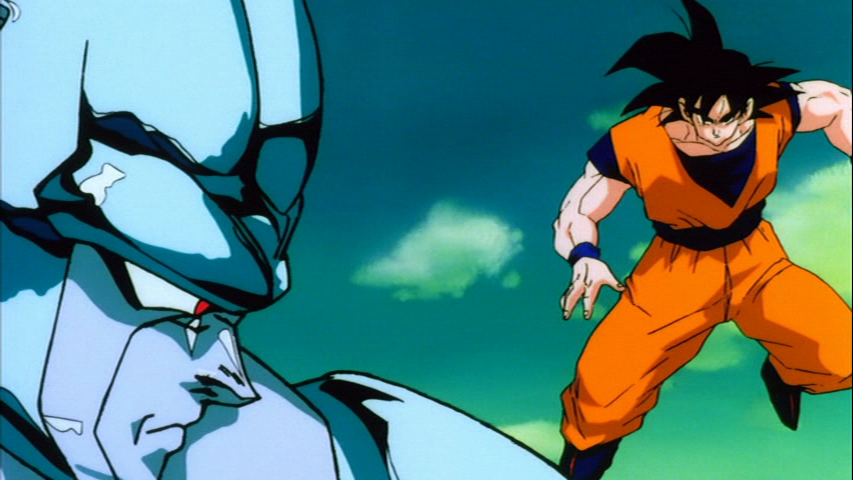
You guys are only looking at the Super Saiyan screenshots. Super Saiyans have always had lighter skin than usual. Look at the shot of normal Goku:jjgp1112 wrote:And Namek once again has the odd bluish color.bkev wrote:Looks like movie 5 is the better-remastered of the two. Seems movie 6 suffers from season 2's pale skin. I think I'll call it "Namek Syndrome".
The colors are fine. You guys must be forgetting just how bright Season Two's colors were.
"Kenshi is sitting down right now drawing his mutated spaghetti monsters thinking he's the shit..."--Neptune Kai
"90% of you here don't even know what you're talking about (there are a few that do). But the things you say about these releases are nonsense and just plain dumb. Like you Metalwario64"--final_flash
"90% of you here don't even know what you're talking about (there are a few that do). But the things you say about these releases are nonsense and just plain dumb. Like you Metalwario64"--final_flash