Color Correcting the Dragon Box - 3 Part Spectacular

Re: Color Correcting the Dragon Box - 3 Part Spectacular
Damn, the corrected ones look so much better. Good job.
-
superrayman3
- OMG CRAZY REGEN
- Posts: 862
- Joined: Thu Oct 13, 2011 10:29 am
- Location: West Virginia USA
Re: Color Correcting the Dragon Box - 3 Part Spectacular
Looks fine to me.ect5150 wrote:Found a different way to manipulate the hues than what is stated in the guide in the first post.
Can I get a few eyes/opinions on these before-&-after shots since my eyes sometimes miss coloring issues (I've focused on a way to minimize the artifacts mentioned in the guide that come about from playing around with the hues, but I think I've found the source of the artifacts and I'm able to compensate for the bulk of it).
Thanks in advance and as always, click to enlarge:


If anyone has any of the DB/DBZ/DBGT or Maho Tsuaki Sally Japanese single DVD's that they'd be interested in selling send me a PM and I'll see if we can work something out.  .
.
.-
AnimeMaakuo
- Advanced Regular
- Posts: 1462
- Joined: Sun Aug 15, 2010 10:10 pm
.
.
Last edited by AnimeMaakuo on Fri Jul 26, 2013 1:29 pm, edited 3 times in total.
My YouTube
Soppa Saiyjins from Dorgou Ballru Zetto is my favorite transformation everah, especially when Trounksoru did it in front of Seru and when Bejita did it when he faced Jingonigen-hachigo. But for real, I use the FUNi pronunciation. - Soppa Saia People
Soppa Saiyjins from Dorgou Ballru Zetto is my favorite transformation everah, especially when Trounksoru did it in front of Seru and when Bejita did it when he faced Jingonigen-hachigo. But for real, I use the FUNi pronunciation. - Soppa Saia People
-
ect5150

- Advanced Regular
- Posts: 1063
- Joined: Fri Sep 15, 2006 9:17 pm
- Location: Tenkaichi Tournament Grounds
Re: Color Correcting the Dragon Box - 3 Part Spectacular
Something more like this?AnimeMaakuo wrote:
Everytime I see an animation cel, or a picture from somewhere, Bulma has the tortoise hair. Not blue.
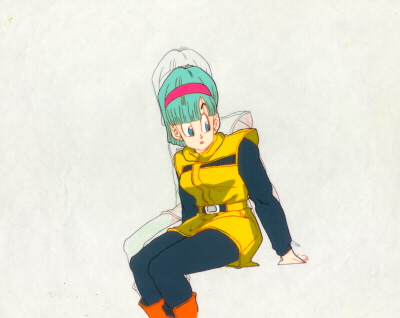
I might be pushing the hue a bit too much blue... it's something to consider.
ect5150
Better to keep your mouth shut and appear stupid than to open it and remove all doubt.
DB DBox color corrections & DBox color corrections.
Better to keep your mouth shut and appear stupid than to open it and remove all doubt.
DB DBox color corrections & DBox color corrections.

Re: Color Correcting the Dragon Box - 3 Part Spectacular
It's just a theory but... Maybe there are a few colours that can't been bring back to its original tone without screwing up some other colours?
That Bulma's hair is an example. The sky blue aged into a cyan/tortoise tone similar to Bulma's hair, but the hair colour didn't get alterate so much because of the nature of the colour and the film on which it is "printed". If you bring back the sky colour to its original blue, its almost impossible to keep Bulma's hair colour intact.
I'm assuming this effect will occur with other colours, not just Bulma's hair/sky greenish tones.
(Sorry for my English. I'm sure I made some mistakes )
)
That Bulma's hair is an example. The sky blue aged into a cyan/tortoise tone similar to Bulma's hair, but the hair colour didn't get alterate so much because of the nature of the colour and the film on which it is "printed". If you bring back the sky colour to its original blue, its almost impossible to keep Bulma's hair colour intact.
I'm assuming this effect will occur with other colours, not just Bulma's hair/sky greenish tones.
(Sorry for my English. I'm sure I made some mistakes
)-
Attitudefan

- I Live Here
- Posts: 2963
- Joined: Tue Aug 03, 2010 9:51 pm
- Location: Canada
Re: Color Correcting the Dragon Box - 3 Part Spectacular
With expensive programs and time put into correcting colours, you can correct each area to the correct colours.
My favourite art style (and animation) outside Toriyama who worked on Dragon Ball: Katsuyoshi Nakatsuru, Masaki Satō, Minoru Maeda, Takeo Ide, Hisashi Eguchi, Katsumi Aoshima, Tomekichi Takeuchi, Masahiro Shimanuki, Kazuya Hisada
-
ect5150
- Advanced Regular
- Posts: 1063
- Joined: Fri Sep 15, 2006 9:17 pm
- Location: Tenkaichi Tournament Grounds
Re: Color Correcting the Dragon Box - 3 Part Spectacular
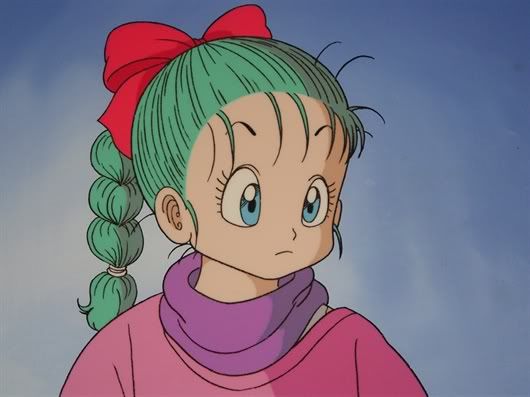
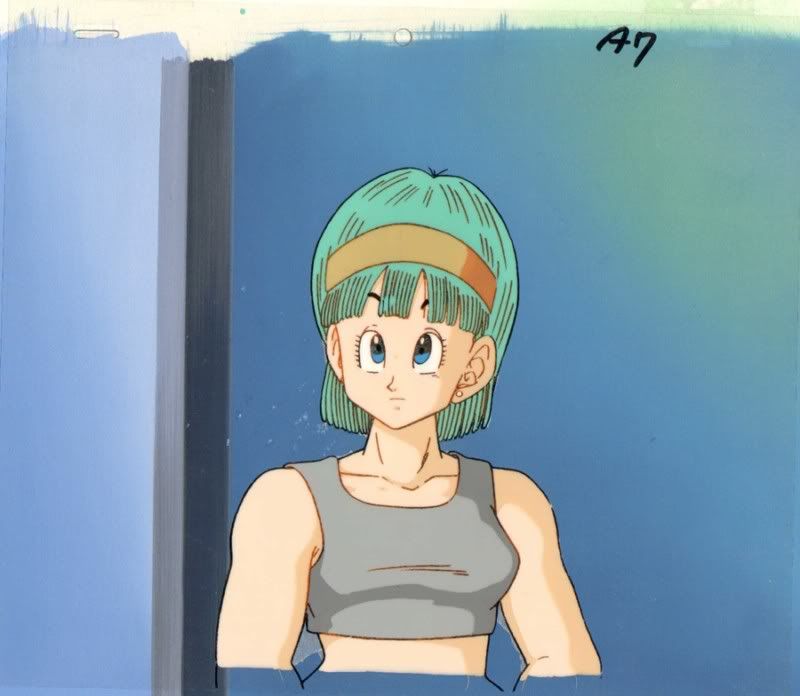
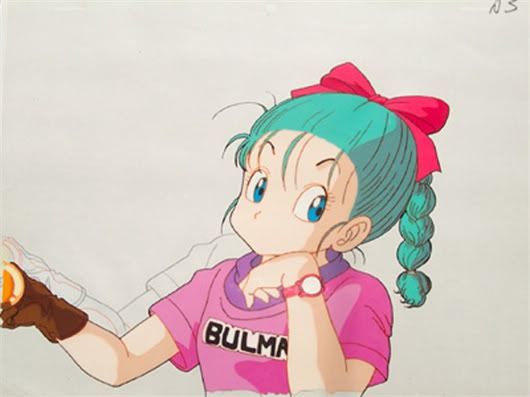
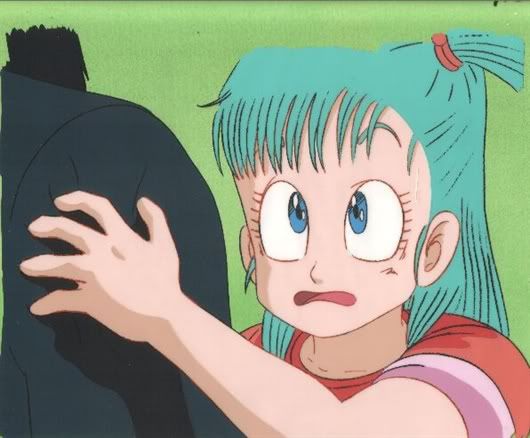
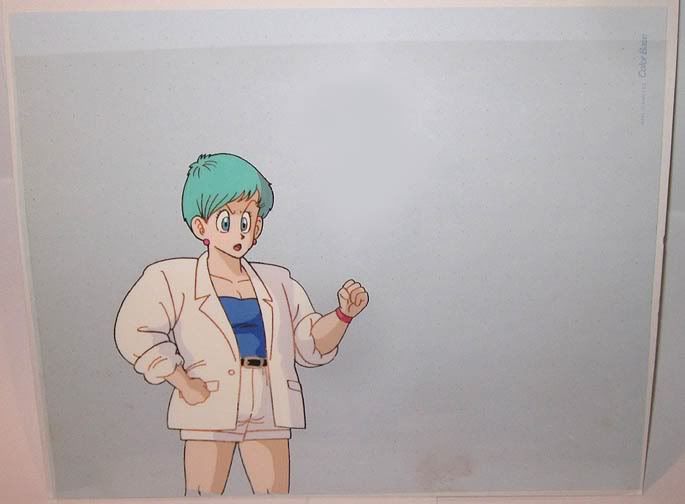
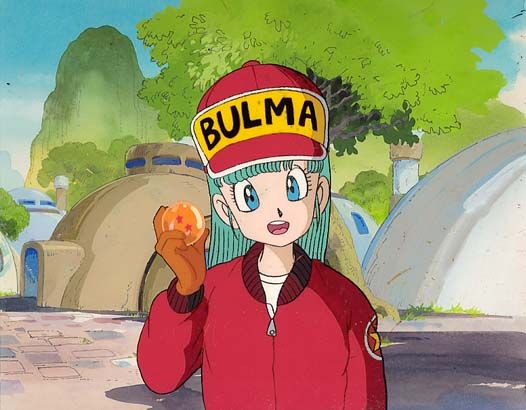
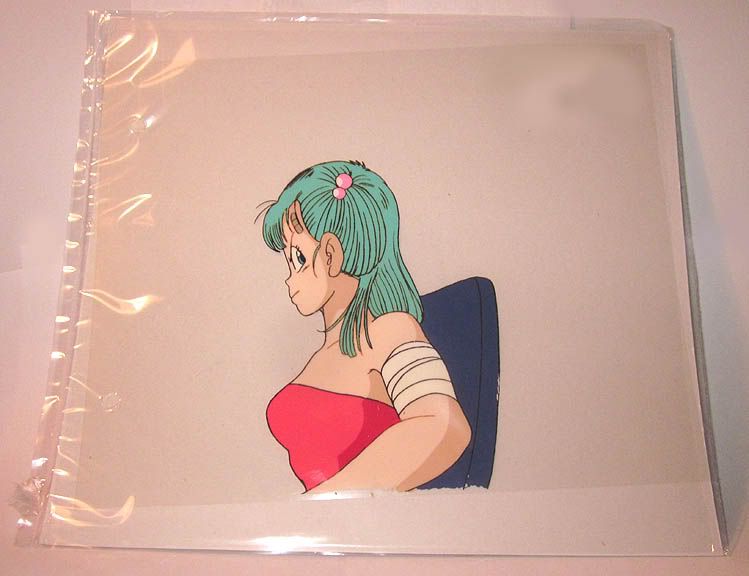
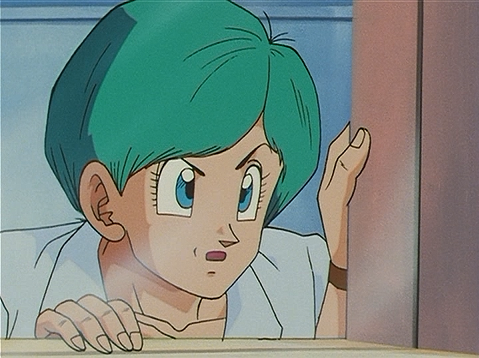
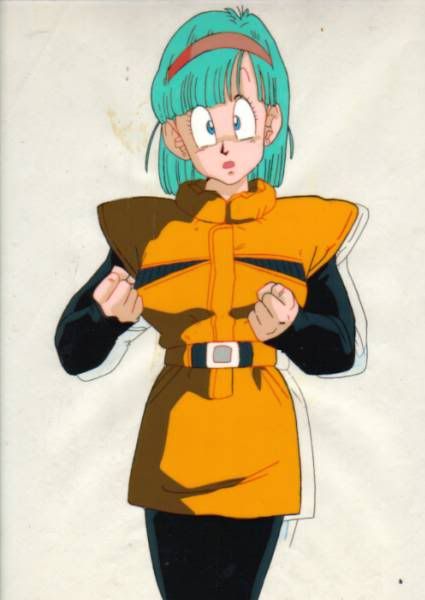
Oh wow AnimeMaakuo... looking at the two pictures and the animation cel, I used to think the "corrected" one looked better.AnimeMaakuo wrote:Everytime I see an animation cel, or a picture from somewhere, Bulma has the tortoise hair. Not blue.

But I ran all three of those through photoshop and looked at the Hue values for Bulma's hair for all three. And the hue values for the uncorrected frame the animation cel are almost identical. A difference of 1 value exists... one was 166 and the other was 167. Now, the saturation and brightness levels were different, but it gives evidence that the color in the uncorrected DBox image is correct and it might just need the color mask removed only.
I'm going to analyze this with a few other scans of cels I've found online and pick the same scenes as the cels and see if we get the same results.
ect5150
Better to keep your mouth shut and appear stupid than to open it and remove all doubt.
DB DBox color corrections & DBox color corrections.
Better to keep your mouth shut and appear stupid than to open it and remove all doubt.
DB DBox color corrections & DBox color corrections.
-
AnimeMaakuo
- Advanced Regular
- Posts: 1462
- Joined: Sun Aug 15, 2010 10:10 pm
Re: Color Correcting the Dragon Box - 3 Part Spectacular
ect5150 wrote:Oh wow AnimeMaakuo... looking at the two pictures and the animation cel, I used to think the "corrected" one looked better.AnimeMaakuo wrote:Everytime I see an animation cel, or a picture from somewhere, Bulma has the tortoise hair. Not blue.
But I ran all three of those through photoshop and looked at the Hue values for Bulma's hair for all three. And the hue values for the uncorrected frame the animation cel are almost identical. A difference of 1 value exists... one was 166 and the other was 167. Now, the saturation and brightness levels were different, but it gives evidence that the color in the uncorrected DBox image is correct and it might just need the color mask removed only.
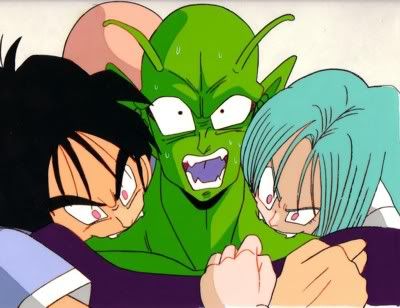
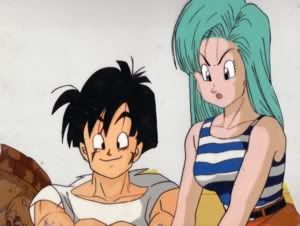
I'm going to analyze this with a few other scans of cels I've found online and pick the same scenes as the cels and see if we get the same results.
My YouTube
Soppa Saiyjins from Dorgou Ballru Zetto is my favorite transformation everah, especially when Trounksoru did it in front of Seru and when Bejita did it when he faced Jingonigen-hachigo. But for real, I use the FUNi pronunciation. - Soppa Saia People
Soppa Saiyjins from Dorgou Ballru Zetto is my favorite transformation everah, especially when Trounksoru did it in front of Seru and when Bejita did it when he faced Jingonigen-hachigo. But for real, I use the FUNi pronunciation. - Soppa Saia People
-
Saiyajin no Tatsujin

- Beyond Newbie
- Posts: 287
- Joined: Sat Aug 09, 2008 3:50 pm
- Location: Roshi Island, training under the Turtle Master.
Re: Color Correcting the Dragon Box - 3 Part Spectacular
Awesome guide! I wish there was a guide to help me color correct the DBoxes on my TV. Now THAT would be even more awesomer. 
-
KiddoCabbusses
- Beyond-the-Beyond Newbie
- Posts: 341
- Joined: Mon Apr 04, 2011 4:18 am
Re: Color Correcting the Dragon Box - 3 Part Spectacular
Are there any good screens with Bulma + Daylight sky, particularly DBox "Green Sky", for reference?biohazard wrote:It's just a theory but... Maybe there are a few colours that can't been bring back to its original tone without screwing up some other colours?
That Bulma's hair is an example. The sky blue aged into a cyan/tortoise tone similar to Bulma's hair, but the hair colour didn't get alterate so much because of the nature of the colour and the film on which it is "printed". If you bring back the sky colour to its original blue, its almost impossible to keep Bulma's hair colour intact.
I'm assuming this effect will occur with other colours, not just Bulma's hair/sky greenish tones.
(Sorry for my English. I'm sure I made some mistakes
Re: Color Correcting the Dragon Box - 3 Part Spectacular
Yeah, that is why masking is always needed when it comes to strict color correction during remastering process.biohazard wrote:It's just a theory but... Maybe there are a few colours that can't been bring back to its original tone without screwing up some other colours?
That Bulma's hair is an example. The sky blue aged into a cyan/tortoise tone similar to Bulma's hair, but the hair colour didn't get alterate so much because of the nature of the colour and the film on which it is "printed". If you bring back the sky colour to its original blue, its almost impossible to keep Bulma's hair colour intact.
I'm assuming this effect will occur with other colours, not just Bulma's hair/sky greenish tones.
(Sorry for my English. I'm sure I made some mistakes
-
ect5150
- Advanced Regular
- Posts: 1063
- Joined: Fri Sep 15, 2006 9:17 pm
- Location: Tenkaichi Tournament Grounds
Re: Color Correcting the Dragon Box - 3 Part Spectacular
That's essentially what I've been doing (somewhat) in removing the artifacts, but it's very slow at times. If you don't do this though, you'll turn the green sky to blue, but at the same time turn Vegeta's uniform from blue to purple.kei17 wrote:Yeah, that is why masking is always needed when it comes to strict color correction during remastering process.
I've found a few ways to speed it up, but I don't see much software out there that is able to streamline it to save time. It's one thing if an episode is uniform, but sometimes it appears as if different scenes need their own adjustment (at that point it becomes too time consuming unless you are getting paid to do it as a job).
ect5150
Better to keep your mouth shut and appear stupid than to open it and remove all doubt.
DB DBox color corrections & DBox color corrections.
Better to keep your mouth shut and appear stupid than to open it and remove all doubt.
DB DBox color corrections & DBox color corrections.

Re: Color Correcting the Dragon Box - 3 Part Spectacular
Pretty much. What I've done on episodes has been a little more advanced compared to what I set up here (and this guide is pretty advanced on its own.) I've done a lot of stuff to try to clamp Bulma's hair by clamping the blue level in gradiation curves. You can get good results doing that.kei17 wrote:Yeah, that is why masking is always needed when it comes to strict color correction during remastering process.
ect5150, great to see you're experimenting! I'm curious what your "new" method is/entails? Did you find a better, more native hue/saturation adjustment tool? I wish there was a gui tool that worked for a lot of the internal AVISynth plugins, since I'd rather do things as native as possible.ect5150 wrote:I've found a few ways to speed it up, but I don't see much software out there that is able to streamline it to save time. It's one thing if an episode is uniform, but sometimes it appears as if different scenes need their own adjustment (at that point it becomes too time consuming unless you are getting paid to do it as a job).
My favorite movie henchman is Sancho.
Follow my stupid crap on Twitter. Please note, I do not have time to reply to any PMs about color correction methods anymore; sorry about that.
[ Hoyoyo! Please pick up our Dr. Slump DVD! ]
Follow my stupid crap on Twitter. Please note, I do not have time to reply to any PMs about color correction methods anymore; sorry about that.
[ Hoyoyo! Please pick up our Dr. Slump DVD! ]
-
Haseowolf

- Patreon Supporter
- Posts: 661
- Joined: Fri Feb 29, 2008 2:37 pm
- Location: Minnesota
- Contact:
Re: Color Correcting the Dragon Box - 3 Part Spectacular
First off I've gotta say that your guide and process is spectacular, Ashura. You've done a fantastic job! It's a shame it took me this long to finally sit down and play with the colors myself!
I'm interested to see your encoding on the fly AVISynth stuff, that's for sure!
Now, I'm quite the VirtualDub/AVISynth noob, so I'm hoping you can answer some questions here for me. What would be the best process for exporting these bad boys with audio? Also, I guess, exporting in general? I've tried "File -> Save as AVI" and it finishes the process, but the resulting video has what appears to be vertical scan lines, is in B&W, and has two videos playing side by side, much as it does for showing original and processed video in VD, but the right hand one is only half showing. Any tips on that?
Thanks again and I can't say enough about your awesome work!
I'm interested to see your encoding on the fly AVISynth stuff, that's for sure!
Now, I'm quite the VirtualDub/AVISynth noob, so I'm hoping you can answer some questions here for me. What would be the best process for exporting these bad boys with audio? Also, I guess, exporting in general? I've tried "File -> Save as AVI" and it finishes the process, but the resulting video has what appears to be vertical scan lines, is in B&W, and has two videos playing side by side, much as it does for showing original and processed video in VD, but the right hand one is only half showing. Any tips on that?
Thanks again and I can't say enough about your awesome work!
-
ect5150
- Advanced Regular
- Posts: 1063
- Joined: Fri Sep 15, 2006 9:17 pm
- Location: Tenkaichi Tournament Grounds
Re: Color Correcting the Dragon Box - 3 Part Spectacular
It sounds like you didn't specify a proper Video codec maybe? Or your Video player doesn't know how to deal with the raw color space? Either way, I think it's more an an issue of the video player than the encoding process.Haseowolf wrote:Now, I'm quite the VirtualDub/AVISynth noob, so I'm hoping you can answer some questions here for me. What would be the best process for exporting these bad boys with audio? Also, I guess, exporting in general? I've tried "File -> Save as AVI" and it finishes the process, but the resulting video has what appears to be vertical scan lines, is in B&W, and has two videos playing side by side, much as it does for showing original and processed video in VD, but the right hand one is only half showing. Any tips on that?
As far as the audio, VDub has a menu where you can import a steam of sorts... just specify the audio file.
That said, I'm in the boat of people that recommends you move away from AVI files as your video files, and move to something like MP4 or MKV files. Google the differences or PM me for other help on that though.
ect5150
Better to keep your mouth shut and appear stupid than to open it and remove all doubt.
DB DBox color corrections & DBox color corrections.
Better to keep your mouth shut and appear stupid than to open it and remove all doubt.
DB DBox color corrections & DBox color corrections.
-
Haseowolf
- Patreon Supporter
- Posts: 661
- Joined: Fri Feb 29, 2008 2:37 pm
- Location: Minnesota
- Contact:
Re: Color Correcting the Dragon Box - 3 Part Spectacular
Alright, cool I'll root around a bit and find import the audio file.ect5150 wrote:It sounds like you didn't specify a proper Video codec maybe? Or your Video player doesn't know how to deal with the raw color space? Either way, I think it's more an an issue of the video player than the encoding process.Haseowolf wrote:Now, I'm quite the VirtualDub/AVISynth noob, so I'm hoping you can answer some questions here for me. What would be the best process for exporting these bad boys with audio? Also, I guess, exporting in general? I've tried "File -> Save as AVI" and it finishes the process, but the resulting video has what appears to be vertical scan lines, is in B&W, and has two videos playing side by side, much as it does for showing original and processed video in VD, but the right hand one is only half showing. Any tips on that?
As far as the audio, VDub has a menu where you can import a steam of sorts... just specify the audio file.
That said, I'm in the boat of people that recommends you move away from AVI files as your video files, and move to something like MP4 or MKV files. Google the differences or PM me for other help on that though.
Oh man, I would LOVE to export as MP4 for this. How can I export my video from VirtualDub as something other than AVI? I couldn't find the options >.<.
Thank ya kindly!
-
Haseowolf
- Patreon Supporter
- Posts: 661
- Joined: Fri Feb 29, 2008 2:37 pm
- Location: Minnesota
- Contact:
Re: Color Correcting the Dragon Box - 3 Part Spectacular
While I'm still working on exporting and all that, I've got my curves and filter settings right where I want them. So, here I'll share some screencaps. Let me know what you all think.


-
overdrive80
- Newbie
- Posts: 1
- Joined: Fri Sep 28, 2012 4:30 pm
Re: Color Correcting the Dragon Box - 3 Part Spectacular
Hi, thanks for your manual but if someone is interesting in the same with pro tools, here a manual for removing color cast http://www.creativecow.net/interstitial ... 1%2F1&id=0
Its really easy. ^^
Its really easy. ^^

Re: Color Correcting the Dragon Box - 3 Part Spectacular
The regular Vdub only does AVIs as output, and its compression codecs are out of date. AVI is an old container; some popular new codecs (like H.264 and MPEG4 video) don't always work on it.Haseowolf wrote:
Alright, cool I'll root around a bit and find import the audio file.
Oh man, I would LOVE to export as MP4 for this. How can I export my video from VirtualDub as something other than AVI? I couldn't find the options >.<.
Thank ya kindly!
Hopefully you did your corrections in Avisynth, because most encoders accept Avisynth scripts as an input. Find an encoder that suits you. If you want to use the MP4 container, you'll have encode to an MPEG4 codec (H.264, AAC, or regular old MPEG4 video). MKV is a good container for anything else.
-
eledoremassis02

- I Live Here
- Posts: 4237
- Joined: Sat Oct 22, 2011 5:40 pm
Re: Color Correcting the Dragon Box - 3 Part Spectacular
I want the dragon box movies so bad!! Color correction looks awesome