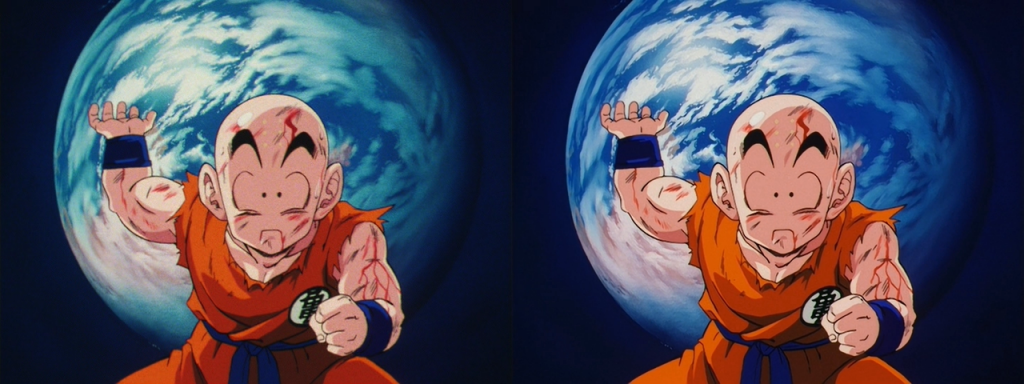
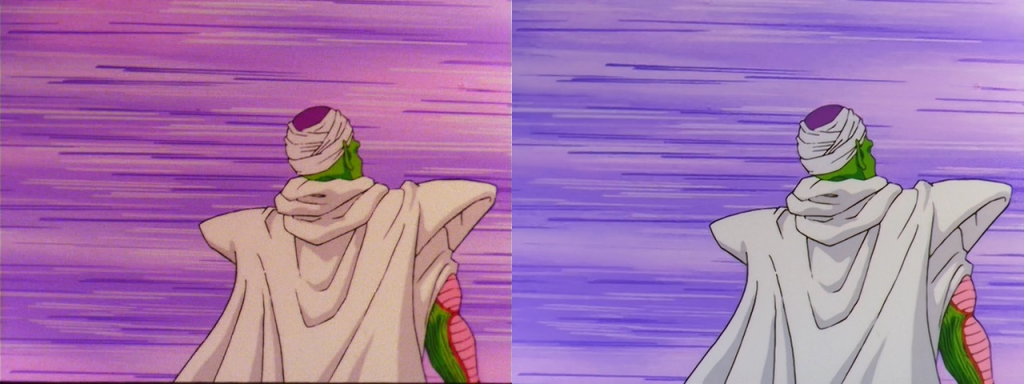
Color Correcting the Dragon Box - 3 Part Spectacular

Discussion regarding the entirety of the franchise in a general (meta) sense, including such aspects as: production, trends, merchandise, fan culture, and more.
Locked
Fulicer
Beyond Newbie
Posts: 193
Joined: Wed Feb 15, 2012 6:51 pm

Re: Color Correcting the Dragon Box - 3 Part Spectacular

Post by Fulicer » Thu Dec 20, 2012 2:24 am

Corpsecreate wrote:So I have now completely corrected the entire Z series. I have a collection of 100 .png files for those that want to see some before/after shots.

NOTE: I also did some filtering (grain removal, sharpening etc)

http://www.mediafire.com/?y79gqpnabpb7b4e

Let me know what you think on the filtering and/or the colours.
Is the grain removal a bit risky in general? In your screenshots it looks good but I always wonder if it can remove too much detail.

Also I think the original FUNi dvds had some kind of sharpening effect, maybe I'm wrong, but it didn't seem to represent finely drawn lines as the DBOX. Your screenshots always looked better compared to the DBOX though...wonder what it would look like in motion.

superrayman3
OMG CRAZY REGEN
Posts: 862
Joined: Thu Oct 13, 2011 10:29 am
Location: West Virginia USA

Re: Color Correcting the Dragon Box - 3 Part Spectacular

Post by superrayman3 » Thu Dec 20, 2012 3:24 am

Fulicer wrote:Is the grain removal a bit risky in general?
It can be a bit risky depending on whether or not the person doing the grain removal knows what they're doing.
Fulicer wrote:In your screenshots it looks good but I always wonder if it can remove too much detail.
Yes grain removal can remove too much detail if too much is used but if your experienced and know how to do it efficiently grain removal can make an image or video look more pleasing to the eye compared to a video that has no no grain removal at all.
Fulicer wrote:Also I think the original FUNi dvds had some kind of sharpening effect, maybe I'm wrong, but it didn't seem to represent finely drawn lines as the DBOX.
I don't know about the original FUNi DVD's could you post a comparison shot?
Fulicer wrote:Your screenshots always looked better compared to the DBOX though...wonder what it would look like in motion.
I'm curious about this as well, with your single shots the results are great but how does that quality fare when things are in motion?

Also I just finished Color correcting the ending sequence of DB movie 3 and I need some opinions on how it looks.
http://www.mediafire.com/?s4yrpxw1az4ktfa
http://www.mediafire.com/?8ul1jeuauwc8bc6
If anyone has any of the DB/DBZ/DBGT or Maho Tsuaki Sally Japanese single DVD's that they'd be interested in selling send me a PM and I'll see if we can work something out. ;).

User avatar
Corpsecreate
Beyond Newbie
Posts: 235
Joined: Tue Sep 13, 2011 7:23 am

Re: Color Correcting the Dragon Box - 3 Part Spectacular

Post by Corpsecreate » Thu Dec 20, 2012 5:20 am

Ill post up a short 20-30 second Goku vs Frieza Scene in a moment.

SSj_Rambo
I Live Here
Posts: 3496
Joined: Tue Apr 01, 2008 4:10 pm
Location: West City

Re: Color Correcting the Dragon Box - 3 Part Spectacular

Post by SSj_Rambo » Thu Dec 20, 2012 5:34 am

Corpsecreate wrote:So I have now completely corrected the entire Z series. I have a collection of 100 .png files for those that want to see some before/after shots.

NOTE: I also did some filtering (grain removal, sharpening etc)

http://www.mediafire.com/?y79gqpnabpb7b4e

Let me know what you think on the filtering and/or the colours.
Looks damn fine! You seem to have significant improvement on motion blur for a lot of frames, did you have a 'sharpen' effect in your process? And I've always loved the old grain of the DragonBoxes, and this is about as much grain removal as I'd ever be able to handle! Any more and season set flashbacks jump to mind... :)

These screenshots in particular really highlight (for me) what you've been able to do. Was it one script for the whole series? Or did you adjust your remastering process based on the deterioration at each point (saga, maybe?) in the series? This work truly does look like something that would go under a "Remastered" title.

http://i290.photobucket.com/albums/ll24 ... 4b8c4b.png
http://i290.photobucket.com/albums/ll24 ... 4095dd.png

@ect5150

Didn't realize how much actual artifacting there was until you removed it. Pretty crucial patch! And it seems to help get the whites (such as the clouds) to look... white. I see what you mean with Goku's hair, though.
ect5150 wrote:Here is a quick screen grab (click to enlarge).

Image
I based the colors on what I remember from the old fansub days and some FUNI clips on YouTube, even though the quality was horrible.
Exactly what I'm talking with the clouds! Though it seems very strange seeing a Namekian sky with no hints of green... I do really love the colors you got from targeting the hue of the animation cels posted earlier.

Also!! Would you be able to re-upload that video comparison?

User avatar
Corpsecreate
Beyond Newbie
Posts: 235
Joined: Tue Sep 13, 2011 7:23 am

Re: Color Correcting the Dragon Box - 3 Part Spectacular

Post by Corpsecreate » Thu Dec 20, 2012 5:46 am

Heres a clip from episode 101 (note this is an encode of an encode): http://www.mediafire.com/?61c7czvopzxptm1

Filtering (sharpening, degrain etc) was done the same for all episodes. Color corrections were done on a per episode basis (which I can tell you, took a LONG time).

One of the best filters used was the stabiliser, you will notice that the jitter is basically completely gone and with no artifacts (from what I can see). I also cleaned up a lot of tape marks in the first 20 or so episodes.

Fulicer
Beyond Newbie
Posts: 193
Joined: Wed Feb 15, 2012 6:51 pm

Re: Color Correcting the Dragon Box - 3 Part Spectacular

Post by Fulicer » Thu Dec 20, 2012 3:55 pm

superrayman3 wrote:
Fulicer wrote:Is the grain removal a bit risky in general?
It can be a bit risky depending on whether or not the person doing the grain removal knows what they're doing.
Fulicer wrote:In your screenshots it looks good but I always wonder if it can remove too much detail.
Yes grain removal can remove too much detail if too much is used but if your experienced and know how to do it efficiently grain removal can make an image or video look more pleasing to the eye compared to a video that has no no grain removal at all.
Fulicer wrote:Also I think the original FUNi dvds had some kind of sharpening effect, maybe I'm wrong, but it didn't seem to represent finely drawn lines as the DBOX.
I don't know about the original FUNi DVD's could you post a comparison shot?
Fulicer wrote:Your screenshots always looked better compared to the DBOX though...wonder what it would look like in motion.
I'm curious about this as well, with your single shots the results are great but how does that quality fare when things are in motion?

Also I just finished Color correcting the ending sequence of DB movie 3 and I need some opinions on how it looks.
http://www.mediafire.com/?s4yrpxw1az4ktfa
http://www.mediafire.com/?8ul1jeuauwc8bc6
My comparisons with the FUNi singles are based on memory. I haven't had them in years. I do remember that when the Dragon Boxes came out, I notice that the outlines of the characters were a lot "softer" compared to the FUNi singles.

Maybe I should have ripped video and audio tracks from the FUNi singles before I sold them....

Anyway, the restorations look great.

User avatar
Gonstead
I Live Here
Posts: 3500
Joined: Thu Oct 13, 2011 9:33 am
Location: New Zealand
Contact:

Re: Color Correcting the Dragon Box - 3 Part Spectacular

Post by Gonstead » Thu Dec 20, 2012 4:06 pm

Corpsecreate wrote:Heres a clip from episode 101 (note this is an encode of an encode): http://www.mediafire.com/?61c7czvopzxptm1

Filtering (sharpening, degrain etc) was done the same for all episodes. Color corrections were done on a per episode basis (which I can tell you, took a LONG time).

One of the best filters used was the stabiliser, you will notice that the jitter is basically completely gone and with no artifacts (from what I can see). I also cleaned up a lot of tape marks in the first 20 or so episodes.
Could you possibly upload Future Trunks turning Super Saiyan? It's become a favourite of mine and going off of the look of Ep 101, it looks great!
Visit DragonBallFigures for all your Dragon Ball figure info and needs!
Mayuri Kurotsuchi wrote:"In this world, nothing perfect exists. It may be a cliche after all but it's the way things are. That's precisely why ordinary men pursue the concept of perfection, it's infatuation. But ultimately I have to ask myself "What is the true meaning of being perfect?" and the answer I came up with was nothing. Not one thing. The truth of the matter is I despise perfection! If something is truly perfect, that's IT! The bottom line becomes there is no room for imagination! No space for intelligence or ability or improvement! Do you understand? To men of science like us, perfection is a dead end, a condition of hopelessness. Always strive to be better than anything that came before you but not perfect! Scientist's agonize over the attempt to achieve perfection! That's the kind of creatures we are! We take joy in trying to exceed our grasp, in trying to reach for something that in the end, we have to admit may in fact be unreachable!"
MY HOLY GRAIL (110% Serious. Please sell me one)

User avatar
Kuwabara
Regular
Posts: 689
Joined: Thu Jun 23, 2011 10:36 am

Re: Color Correcting the Dragon Box - 3 Part Spectacular

Post by Kuwabara » Thu Dec 20, 2012 9:42 pm

Corpsecreate, your work is absolutely phenomenal! Scanning the film in at 1080p almost seems unnecessary after seeing your screens and watching that excerpt... :shock:
This is the episode of when Gokuh enrages himself after Freezer talk shit about Kuririn

rereboy
Namekian Warrior
Posts: 10262
Joined: Fri Jan 09, 2009 8:42 pm

Re: Color Correcting the Dragon Box - 3 Part Spectacular

Post by rereboy » Thu Dec 20, 2012 9:58 pm

Corpsecreate wrote:Heres a clip from episode 101 (note this is an encode of an encode): http://www.mediafire.com/?61c7czvopzxptm1
Hmm, this file accused something on my anti-virus.

User avatar
eledoremassis02
I Live Here
Posts: 4211
Joined: Sat Oct 22, 2011 5:40 pm

Re: Color Correcting the Dragon Box - 3 Part Spectacular

Post by eledoremassis02 » Thu Dec 20, 2012 10:18 pm

what program you using?

I have AVG and scanned it and nothing showed up

User avatar
Corpsecreate
Beyond Newbie
Posts: 235
Joined: Tue Sep 13, 2011 7:23 am

Re: Color Correcting the Dragon Box - 3 Part Spectacular

Post by Corpsecreate » Fri Dec 21, 2012 1:09 am

rereboy wrote:
Corpsecreate wrote:Heres a clip from episode 101 (note this is an encode of an encode): http://www.mediafire.com/?61c7czvopzxptm1
Hmm, this file accused something on my anti-virus.
Thats strange. It is a video file after all, I don't think its even possible for a video to have a virus in it. It would have to be an executable of some kind.

Heres Future Trunks going super saiyan: http://www.mediafire.com/?ne9ctg3z8rr3bmx

User avatar
Zestanor
Regular
Posts: 556
Joined: Mon Mar 28, 2011 4:28 pm
Contact:

Re: Color Correcting the Dragon Box - 3 Part Spectacular

Post by Zestanor » Fri Dec 21, 2012 3:08 am

It's a good effort, but I prefer the minimalist restoration approach of the DBOXes. Call me weird, but when the early episodes go into faded red mode, my brain just sees it as warm colors and my eyes adjust. Any manual attempts to fix these parts always look a bit off, to me. And I prefer grain and somewhat soft, but thin, edges to exaggerated lines with halos and 4:2:0 saturation noise around the edges from a grain blur.

rereboy
Namekian Warrior
Posts: 10262
Joined: Fri Jan 09, 2009 8:42 pm

Re: Color Correcting the Dragon Box - 3 Part Spectacular

Post by rereboy » Fri Dec 21, 2012 6:22 am

eledoremassis02 wrote:what program you using?

I have AVG and scanned it and nothing showed up
Avira.

rereboy
Namekian Warrior
Posts: 10262
Joined: Fri Jan 09, 2009 8:42 pm

Re: Color Correcting the Dragon Box - 3 Part Spectacular

Post by rereboy » Fri Dec 21, 2012 6:24 am

Corpsecreate wrote: Thats strange. It is a video file after all, I don't think its even possible for a video to have a virus in it. It would have to be an executable of some kind.

Heres Future Trunks going super saiyan: http://www.mediafire.com/?ne9ctg3z8rr3bmx
It might have been the website itself. I don't remember what the name of the malware was but I believe it was detected on the cache files right when the video ended downloading.

User avatar
ect5150
Advanced Regular
Posts: 1063
Joined: Fri Sep 15, 2006 9:17 pm
Location: Tenkaichi Tournament Grounds

Re: Color Correcting the Dragon Box - 3 Part Spectacular

Post by ect5150 » Sun Dec 23, 2012 10:01 pm

SSj_Rambo wrote: @ect5150

Didn't realize how much actual artifacting there was until you removed it. Pretty crucial patch! And it seems to help get the whites (such as the clouds) to look... white. I see what you mean with Goku's hair, though.
ect5150 wrote:Here is a quick screen grab (click to enlarge).

Image
I based the colors on what I remember from the old fansub days and some FUNI clips on YouTube, even though the quality was horrible.
Exactly what I'm talking with the clouds! Though it seems very strange seeing a Namekian sky with no hints of green... I do really love the colors you got from targeting the hue of the animation cels posted earlier.

Also!! Would you be able to re-upload that video comparison?
Heck, did I upload something? I've had/will have limited PC access for the next several months, so my updates will have to wait until then. That said I'm only targeting the color correction. I think the grain removal done here is pretty nice, but some of us prefer it grainy and there are some details removed (but it has been kept minimal here it appears).

After checking my harddrive it appears I've gotten rid of the movie files (but I've saved my scripts). Apparently, these are the colors I settled on:
Image It's a mix between the two above but it was based more on the cell posted, but for some reason I'm just not really happy with it and I must have decided to try another move and come back to Movie 6 at a later date )unhappy here means I felt it was still just a bit too green, but altering green clouds altered Piccolo in some other scene, etc...)

After searching, is this the video you refered to?

http://bit(period)ly/VYiATK

Change the (period) to a . to make the link work. I keep getting my links taken down from other sources.
ect5150
Better to keep your mouth shut and appear stupid than to open it and remove all doubt.
DB DBox color corrections & DBox color corrections.

SSj_Rambo
I Live Here
Posts: 3496
Joined: Tue Apr 01, 2008 4:10 pm
Location: West City

Re: Color Correcting the Dragon Box - 3 Part Spectacular

Post by SSj_Rambo » Mon Dec 24, 2012 5:44 am

That may be the video. I never saw it originally, but was referring to this post.

Sometimes the clouds look extra green, but overall your filtering is great!

User avatar
Puto
I Live Here
Posts: 2668
Joined: Wed Oct 08, 2008 3:40 am
Location: Portugal, Oeiras

Re: Color Correcting the Dragon Box - 3 Part Spectacular

Post by Puto » Mon Dec 24, 2012 1:21 pm

Okay. I really have to ask.

What did you use to remove the shaking? It... looks really good.
Blue wrote:I love how Season 2 is so off color even the box managed to be so.

User avatar
Corpsecreate
Beyond Newbie
Posts: 235
Joined: Tue Sep 13, 2011 7:23 am

Re: Color Correcting the Dragon Box - 3 Part Spectacular

Post by Corpsecreate » Mon Dec 24, 2012 2:15 pm

Puto wrote:Okay. I really have to ask.

What did you use to remove the shaking? It... looks really good.
An Avisynth filter called Stab(). It works really well :)

User avatar
Puto
I Live Here
Posts: 2668
Joined: Wed Oct 08, 2008 3:40 am
Location: Portugal, Oeiras

Re: Color Correcting the Dragon Box - 3 Part Spectacular

Post by Puto » Mon Dec 24, 2012 5:07 pm

Doesn't that have a side-effect that causes some frames to turn green or something?
Blue wrote:I love how Season 2 is so off color even the box managed to be so.

User avatar
Corpsecreate
Beyond Newbie
Posts: 235
Joined: Tue Sep 13, 2011 7:23 am

Re: Color Correcting the Dragon Box - 3 Part Spectacular

Post by Corpsecreate » Mon Dec 24, 2012 5:52 pm

Never seen it a single time.

Locked