Once again, not a professional, but I've seen enough of this general type of thing to understand the bottom is getting close to being too dark. Though, not close enough to be bad, just enough to say the top is better. Could you easily create a median and post? Somewhere in the middle may be even better!genjosanzo8 wrote:thanks i was asking because on the episodes the black is not really black so i have try to have a white white and a black black but it feel a bit too dark so i ask for professionnal opinion
Color Correcting the Dragon Box - 3 Part Spectacular
-
Ss5Troten

- Not-So-Newbie
- Posts: 98
- Joined: Sun Jun 30, 2013 9:31 am
- Location: Los Angeles/Tucson/Dallas
Re: Color Correcting the Dragon Box - 3 Part Spectacular
Super Saiya-jin 5 Toroten
A list of things I might need in my collection (contact me if you should want/need to let go of yours!):
A list of things I might need in my collection (contact me if you should want/need to let go of yours!):
Spoiler:
-
genjosanzo8
- Beyond-the-Beyond Newbie
- Posts: 306
- Joined: Wed Feb 10, 2016 6:58 am
Re: Color Correcting the Dragon Box - 3 Part Spectacular
no i use photoshop to have an .acv and the first is if i corrected only white, if i correct white and black i obtain the second
so when i will encode it will be the first or the second i haven't find the middle (the ashura technic)
so when i will encode it will be the first or the second i haven't find the middle (the ashura technic)
-
Ss5Troten
- Not-So-Newbie
- Posts: 98
- Joined: Sun Jun 30, 2013 9:31 am
- Location: Los Angeles/Tucson/Dallas
Re: Color Correcting the Dragon Box - 3 Part Spectacular
I'm pretty certain that the top is more than acceptable, it looks very comfortable, I would just stay about there unless a real pro says otherwise.genjosanzo8 wrote:no i use photoshop to have an .acv and the first is if i corrected only white, if i correct white and black i obtain the second
so when i will encode it will be the first or the second i haven't find the middle (the ashura technic)
Super Saiya-jin 5 Toroten
A list of things I might need in my collection (contact me if you should want/need to let go of yours!):
A list of things I might need in my collection (contact me if you should want/need to let go of yours!):
Spoiler:
-
genjosanzo8
- Beyond-the-Beyond Newbie
- Posts: 306
- Joined: Wed Feb 10, 2016 6:58 am
Re: Color Correcting the Dragon Box - 3 Part Spectacular
here another screen with the one you don't like to see...

-
Ss5Troten
- Not-So-Newbie
- Posts: 98
- Joined: Sun Jun 30, 2013 9:31 am
- Location: Los Angeles/Tucson/Dallas
Re: Color Correcting the Dragon Box - 3 Part Spectacular
That one is actually nice, still a slight bit saturated, may we see more with these settings that include the sky and maybe Gokuu's gi? Those are pretty good indicators for colorgenjosanzo8 wrote:here another screen with the one you don't like to see...
Super Saiya-jin 5 Toroten
A list of things I might need in my collection (contact me if you should want/need to let go of yours!):
A list of things I might need in my collection (contact me if you should want/need to let go of yours!):
Spoiler:
-
genjosanzo8
- Beyond-the-Beyond Newbie
- Posts: 306
- Joined: Wed Feb 10, 2016 6:58 am
Re: Color Correcting the Dragon Box - 3 Part Spectacular
here is two shots with the sky
and one with goku outfits the last is for kai 2.0
and one with goku outfits the last is for kai 2.0
Spoiler:


-
Ss5Troten
- Not-So-Newbie
- Posts: 98
- Joined: Sun Jun 30, 2013 9:31 am
- Location: Los Angeles/Tucson/Dallas
Re: Color Correcting the Dragon Box - 3 Part Spectacular
I don't know how I feel about the bottom one, it really has me confused because it just feels off but I feel like if you changed it something else would feel off. The top looks great, though I believe it's just a little too dark (or maybe has just a bit too much red?), is it the first one I said was too dark earlier? The middle looks awesome. A bit light but I think that's how it's actually supposed to look. I hate to harp on it, but I'm no professional, so I may be totally off. This is just what seems to represent the "right" colors to my own eyes.genjosanzo8 wrote:here is two shots with the sky
and one with goku outfits the last is for kai 2.0Spoiler:
Super Saiya-jin 5 Toroten
A list of things I might need in my collection (contact me if you should want/need to let go of yours!):
A list of things I might need in my collection (contact me if you should want/need to let go of yours!):
Spoiler:

Re: Color Correcting the Dragon Box - 3 Part Spectacular
Here's what I've been doing today. Working on the last episode of Kai, right now.
It's all going reasonably well. The issue is I still can't inverse what they did to Piccolo without doing it scene by scene. As it stands, Piccolo looks like this with the other colour correction, and that's deliberately ignoring the green shift on Goku's trousers. If I fix that, then Piccolo becomes blue, too. I feel like they either edited Piccolo on a scene to scene basis, or they isolated his colour range and changed it that way. The thing is, I've isolated and changed them the same way, but it's super destructive, so I doubt that's what they did.
I'm not opposed to fixing Piccolo per scene since he's not exactly in the Boo arc all that much, but it definitely adds a lot more work in the long run.
Spoiler:

I'm not opposed to fixing Piccolo per scene since he's not exactly in the Boo arc all that much, but it definitely adds a lot more work in the long run.
Follow me on Twitter for countless shitposts.
Deadtuber.
Deadtuber.
-
genjosanzo8
- Beyond-the-Beyond Newbie
- Posts: 306
- Joined: Wed Feb 10, 2016 6:58 am
Re: Color Correcting the Dragon Box - 3 Part Spectacular
@ss5troten it is too dark yes so it is over saturated it's why i hesitate between 2 parameters.....
@ajay you are very far in level than me (but i don't search to be the same as the cellscan
i hope your correction will work with piccollo in few times
@ajay you are very far in level than me
(but i don't search to be the same as the cellscan i hope your correction will work with piccollo in few times
-
Ss5Troten
- Not-So-Newbie
- Posts: 98
- Joined: Sun Jun 30, 2013 9:31 am
- Location: Los Angeles/Tucson/Dallas
Re: Color Correcting the Dragon Box - 3 Part Spectacular
@ajay now maybe not soooo much, perhaps you have too little green/ juuuust too much blue? Maybe Piccolo is being hit a bit by both? I'm sorry to interject without previous knowledge
@genjo that's what I figured, it still looks awesome great work, keep it up!
@genjo that's what I figured, it still looks awesome great work, keep it up!
Super Saiya-jin 5 Toroten
A list of things I might need in my collection (contact me if you should want/need to let go of yours!):
A list of things I might need in my collection (contact me if you should want/need to let go of yours!):
Spoiler:
Re: Color Correcting the Dragon Box - 3 Part Spectacular
Yeah, you're right. I went too blue. Here's a video with what I'm pretty happy with: https://www.youtube.com/watch?v=7jzowiK ... e=youtu.beSs5Troten wrote:@ajay now maybe not soooo much, perhaps you have too little green/ juuuust too much blue? Maybe Piccolo is being hit a bit by both? I'm sorry to interject without previous knowledge
Follow me on Twitter for countless shitposts.
Deadtuber.
Deadtuber.
-
Ss5Troten
- Not-So-Newbie
- Posts: 98
- Joined: Sun Jun 30, 2013 9:31 am
- Location: Los Angeles/Tucson/Dallas
Re: Color Correcting the Dragon Box - 3 Part Spectacular
I'm happy that my instinct was correct here, I love the video, checking your others and subscribed! Yeah I'd like to see what Piccolo is looking like now with a little less blue!Ajay wrote:Yeah, you're right. I went too blue. Here's a video with what I'm pretty happy with: https://www.youtube.com/watch?v=7jzowiK ... e=youtu.beSs5Troten wrote:@ajay now maybe not soooo much, perhaps you have too little green/ juuuust too much blue? Maybe Piccolo is being hit a bit by both? I'm sorry to interject without previous knowledge
Super Saiya-jin 5 Toroten
A list of things I might need in my collection (contact me if you should want/need to let go of yours!):
A list of things I might need in my collection (contact me if you should want/need to let go of yours!):
Spoiler:
Re: Color Correcting the Dragon Box - 3 Part Spectacular
Still too dark, but definitely better:Ss5Troten wrote:I'm happy that my instinct was correct here, I love the video, checking your others and subscribed! Yeah I'd like to see what Piccolo is looking like now with a little less blue!
Spoiler:

Follow me on Twitter for countless shitposts.
Deadtuber.
Deadtuber.
-
Ss5Troten
- Not-So-Newbie
- Posts: 98
- Joined: Sun Jun 30, 2013 9:31 am
- Location: Los Angeles/Tucson/Dallas
Re: Color Correcting the Dragon Box - 3 Part Spectacular
@ajay oh man that looks just great! I don't know that you'll get much better than that without having to break it down. Keep it up, I'll be following your work!
Super Saiya-jin 5 Toroten
A list of things I might need in my collection (contact me if you should want/need to let go of yours!):
A list of things I might need in my collection (contact me if you should want/need to let go of yours!):
Spoiler:

Re: Color Correcting the Dragon Box - 3 Part Spectacular
Just a question Ajay, but do you use the Toei cel scans as a reference to correct or do you use other cels? The one's Toei provided seem like they have been altered in some way compared to the cels that float around nowadays. Just look at the difference in the color of their clothes and skin tones in the Toei scan compared to one I found online:Ajay wrote:Yeah, you're right. I went too blue. Here's a video with what I'm pretty happy with: https://www.youtube.com/watch?v=7jzowiK ... e=youtu.beSs5Troten wrote:@ajay now maybe not soooo much, perhaps you have too little green/ juuuust too much blue? Maybe Piccolo is being hit a bit by both? I'm sorry to interject without previous knowledge
Spoiler:
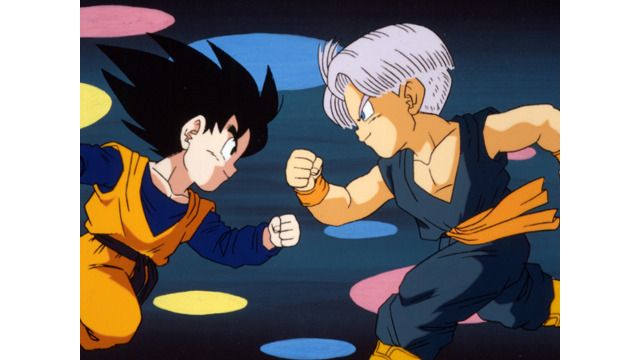
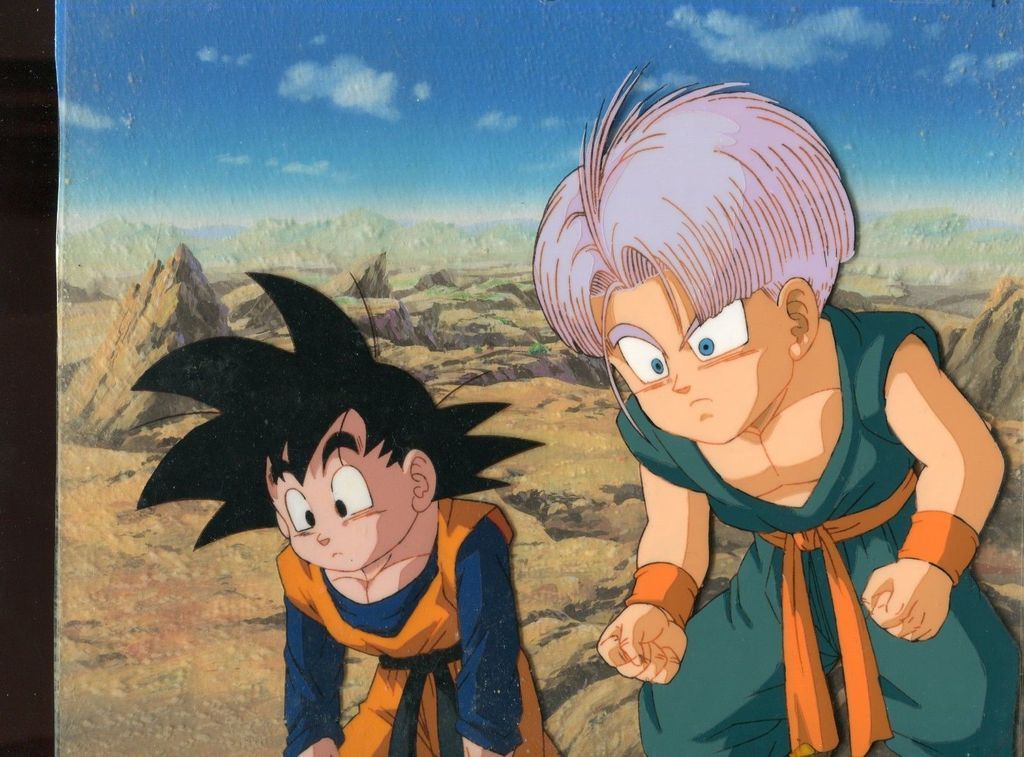
-
genjosanzo8
- Beyond-the-Beyond Newbie
- Posts: 306
- Joined: Wed Feb 10, 2016 6:58 am
Re: Color Correcting the Dragon Box - 3 Part Spectacular
here a try on dragon ball dragon box
even if your goal is to match the cellscan are they the real color? compared color of your quasi perfect color correction and the kai ending redrawn goku
i think that the color in kai was intentionally change is that why you cannot correct like you want (palet change)
the cellscan is a dbz cellscan (i don't know if you have correct dbz dragon box too and if you had been the piccolo color problem) so it 's maybe for that that you cannot have exactly the same color....
you made a wonderful job far beyond what i can do and i admire it
edit: bye bye green sky

Spoiler:

Spoiler:


the cellscan is a dbz cellscan (i don't know if you have correct dbz dragon box too and if you had been the piccolo color problem) so it 's maybe for that that you cannot have exactly the same color....
you made a wonderful job far beyond what i can do and i admire it
edit: bye bye green sky
-
Ss5Troten
- Not-So-Newbie
- Posts: 98
- Joined: Sun Jun 30, 2013 9:31 am
- Location: Los Angeles/Tucson/Dallas
Re: Color Correcting the Dragon Box - 3 Part Spectacular
@genjo I love what you've done with Buruma and Kuririn, those frames look excellent. I agree with EoZ Goku, I personally thought the color correcting was a bit blue and a little less green. I have I disagree slightly with the Kai ending though, they may just be referring the "greened" colors that time has offered them. I think it would be greener than the corrections but bluer than the EoZ Kai frame.
Super Saiya-jin 5 Toroten
A list of things I might need in my collection (contact me if you should want/need to let go of yours!):
A list of things I might need in my collection (contact me if you should want/need to let go of yours!):
Spoiler:
Re: Color Correcting the Dragon Box - 3 Part Spectacular
I've been going by Toei's, but you do make a good point. I'll have a play around later and see how things look with the gi matched to that teal colour. I get the feeling that'll 100% fix Piccolo, since it was that blue shift throwing things off, I thinkMrWalnut4 wrote:Just a question Ajay, but do you use the Toei cel scans as a reference to correct or do you use other cels? The one's Toei provided seem like they have been altered in some way compared to the cels that float around nowadays. Just look at the difference in the color of their clothes and skin tones in the Toei scan compared to one I found online]
The skies in those scenes are actually supposed be a little on the green side:genjosanzo8 wrote: edit: bye bye green skySpoiler:

Tone down your blue and you'll be fine.
Follow me on Twitter for countless shitposts.
Deadtuber.
Deadtuber.
-
genjosanzo8
- Beyond-the-Beyond Newbie
- Posts: 306
- Joined: Wed Feb 10, 2016 6:58 am
Re: Color Correcting the Dragon Box - 3 Part Spectacular
thanks i will do it
-
Ss5Troten
- Not-So-Newbie
- Posts: 98
- Joined: Sun Jun 30, 2013 9:31 am
- Location: Los Angeles/Tucson/Dallas
Re: Color Correcting the Dragon Box - 3 Part Spectacular
The two of you are making great leeway! I can't wait to see more. I'm interested in what hue changes are made as I have my JP Dragon Boxes on my SSD and use VLC, so I like to tinker around. I have yet to on this level though. You guys are really improving upon an already great format!
Super Saiya-jin 5 Toroten
A list of things I might need in my collection (contact me if you should want/need to let go of yours!):
A list of things I might need in my collection (contact me if you should want/need to let go of yours!):
Spoiler: