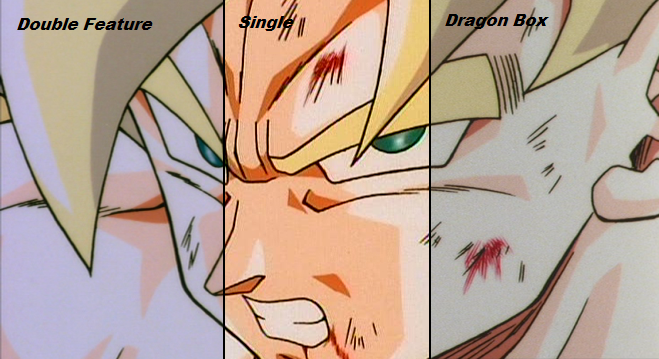
Um, guys, I
just posted a mini-tutorial about correct resizing and suggested several DVD decrypting programs.
The fact of the matter is, you can not do a fair comparison between screenshots unless they are processed
exactly the same way. In
this post, we have one image at 800×450 pixels, and another at 853×480. Neither of these is the correct size, but even if they were, they would both need to have the same dimensions in order to be comparable. Then we have
another one at 886×487, which is also incorrect for this output (it would be
almost correct—1 pixel too tall—for a square-pixel
D1 equivalent, but that’s not what we’re trying to do here).
jjgp1112 wrote:I had to do a lot of resizing to the Remastered pic, so that probably explains why it looks so blurry.
There is no reason you should have to do any more than one resize for each picture. The Dragon Box and Double Feature shots should both be 875×480. The Single should be 656×480. All 480 pixels tall; no upscaling (which introduced the blur) required. Then make your divisions: to have it equally distributed, crop two of them to 292 pixels wide (I’d probably go with the parts on either end) and one of them to 291.
Additionally,
do not save it as a JPEG! This is a lossy image format and creates compression artifacts unless you increase the quality factor (and thus file size). Save as PNG. It creates small, lossless images.
SSj Kaboom wrote:I thought so, I knew that didn't look like the original screencap. Might be worth a do-over.
I could do it if no one else wants to, provided I had an unaltered screenshot from each source.
jjgp1112 wrote:Oh, and how can you capture videos from DVD's? I want to post a few clips from these.
I recommend VirtualDubMod.


 ) what do you think of the English version's BGM.